
Color Rules
Color rules apply conditional formatting to grid cells, making patterns and anomalies visually obvious at a glance.
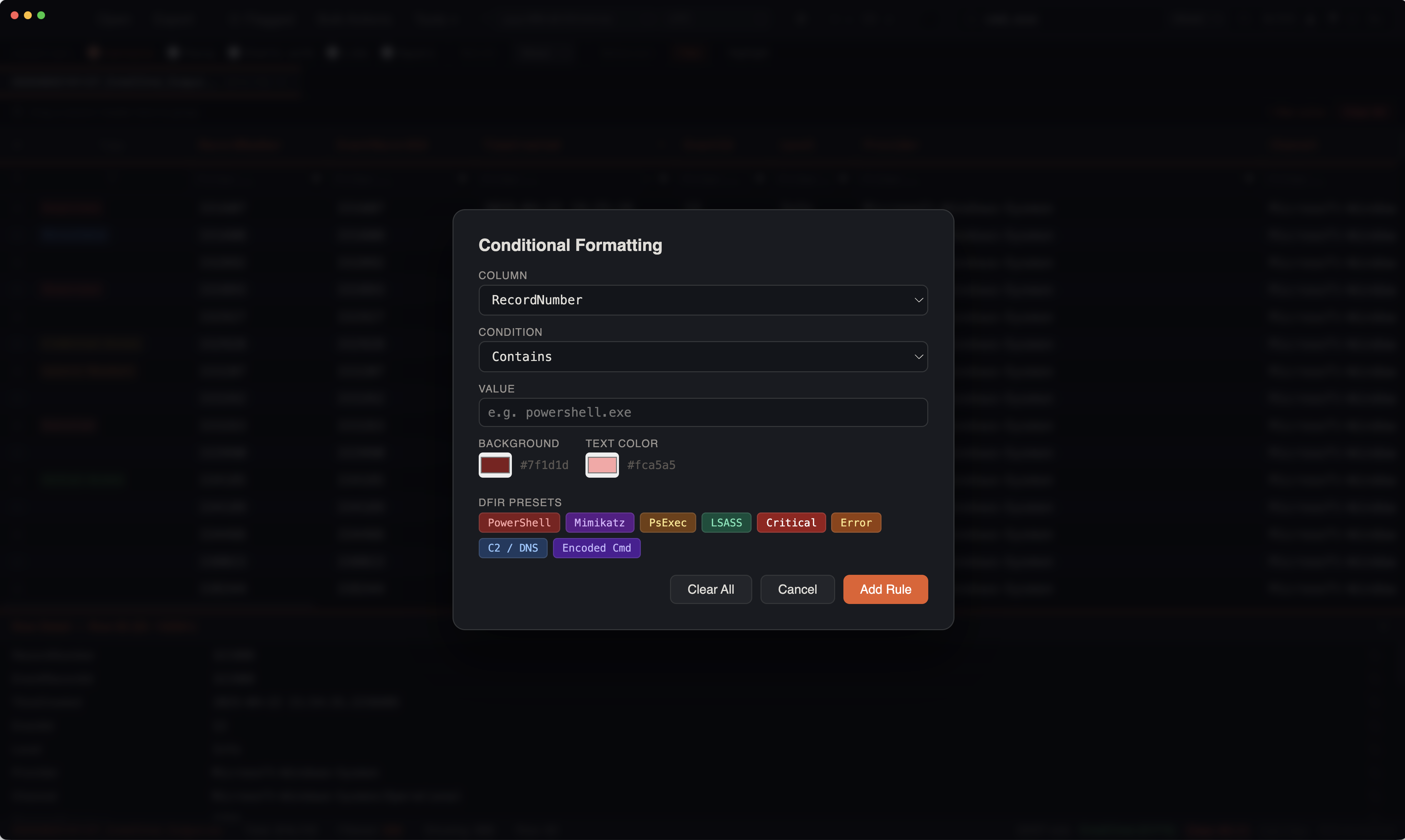
Creating Color Rules
- Open View > Color Rules or
Cmd+Clicka cell and select Create Color Rule - Configure the rule:
- Column — which column to evaluate (or "Any Column")
- Condition — matching logic (see below)
- Value — the pattern or text to match
- Background color — cell highlight color
- Foreground color — text color
Condition Types
| Condition | Description | Example |
|---|---|---|
| Contains | Substring match (case-insensitive) | powershell |
| Equals | Exact match | 4624 |
| Starts with | Prefix match | C:\Windows\Temp |
| Regex | Regular expression | (?i)invoke-\w+ |
Rule Ordering
Rules are evaluated top to bottom. The first matching rule wins for each cell. Drag rules in the editor to reorder priority.
KAPE-Aware Presets
IRFlow Timeline includes pre-built color rule sets for common DFIR artifacts:
Suspicious Process Indicators
| Pattern | Color | Detects |
|---|---|---|
powershell | Red | PowerShell execution |
mimikatz | Red | Credential dumping |
lsass | Red | LSASS access |
cmd.exe | Orange | Command shell |
wscript / cscript | Orange | Script hosts |
certutil | Orange | LOLBin abuse |
bitsadmin | Orange | LOLBin abuse |
mshta | Orange | LOLBin abuse |
rundll32 | Yellow | Suspicious execution |
regsvr32 | Yellow | Suspicious execution |
Path-Based Rules
| Pattern | Color | Detects |
|---|---|---|
\Temp\ | Yellow | Temp directory execution |
\AppData\ | Yellow | User profile execution |
\Downloads\ | Yellow | Downloaded file execution |
\ProgramData\ | Yellow | Unusual execution path |
Auto-Color Palette
When a KAPE profile is detected, IRFlow Timeline can automatically generate color rules based on unique values in a designated column. For example, EvtxECmd output can be auto-colored by Channel so that Security, Sysmon, System, and Application events each have a distinct background color.
Performance
Color rules are pre-compiled into optimized matching functions when created or modified. This means:
- Regex patterns are compiled once, not on every cell evaluation
- Contains/equals/starts with/ends with use fast string operations
- Rules are evaluated per-visible-row only (virtual scrolling means only ~50 rows need evaluation at a time)
Managing Rules
- Edit — click a rule in the list to modify it
- Delete — remove rules you no longer need
- Enable/Disable — toggle rules without deleting them
- Import/Export — rules are saved and restored with sessions