
RDP Bitmap Cache
IRFlow Timeline includes an RDP Bitmap Cache workflow for recovering visual remnants from Windows user profile cache files.
The feature wraps ANSSI-FR bmc-tools and is intended for lateral movement and hands-on-keyboard review where screenshots are unavailable but RDP cache artifacts may still reveal remote desktop activity.
Supported Artifacts
The scanner looks for:
bcache*.bmccache????.bin
These files are commonly found under Windows user profile paths such as:
Users\<user>\AppData\Local\Microsoft\Terminal Server Client\CacheYou can select one cache file or a parent directory. Directory scanning is recursive and symlinks are skipped by default.
Opening
- Menu: Tools → Platforms → Windows → RDP Bitmap Cache
Workflow
- Open Tools → Platforms → Windows → RDP Bitmap Cache.
- Select a cache source file or folder.
- Confirm the preflight summary: cache file count, size, detected profiles, and cache directories.
- Select
bmc-toolsif the bundled copy is unavailable. - Click Extract Images.
- Review recovered collages and tiles in the image preview.
- Export an evidence package for reporting or handoff.
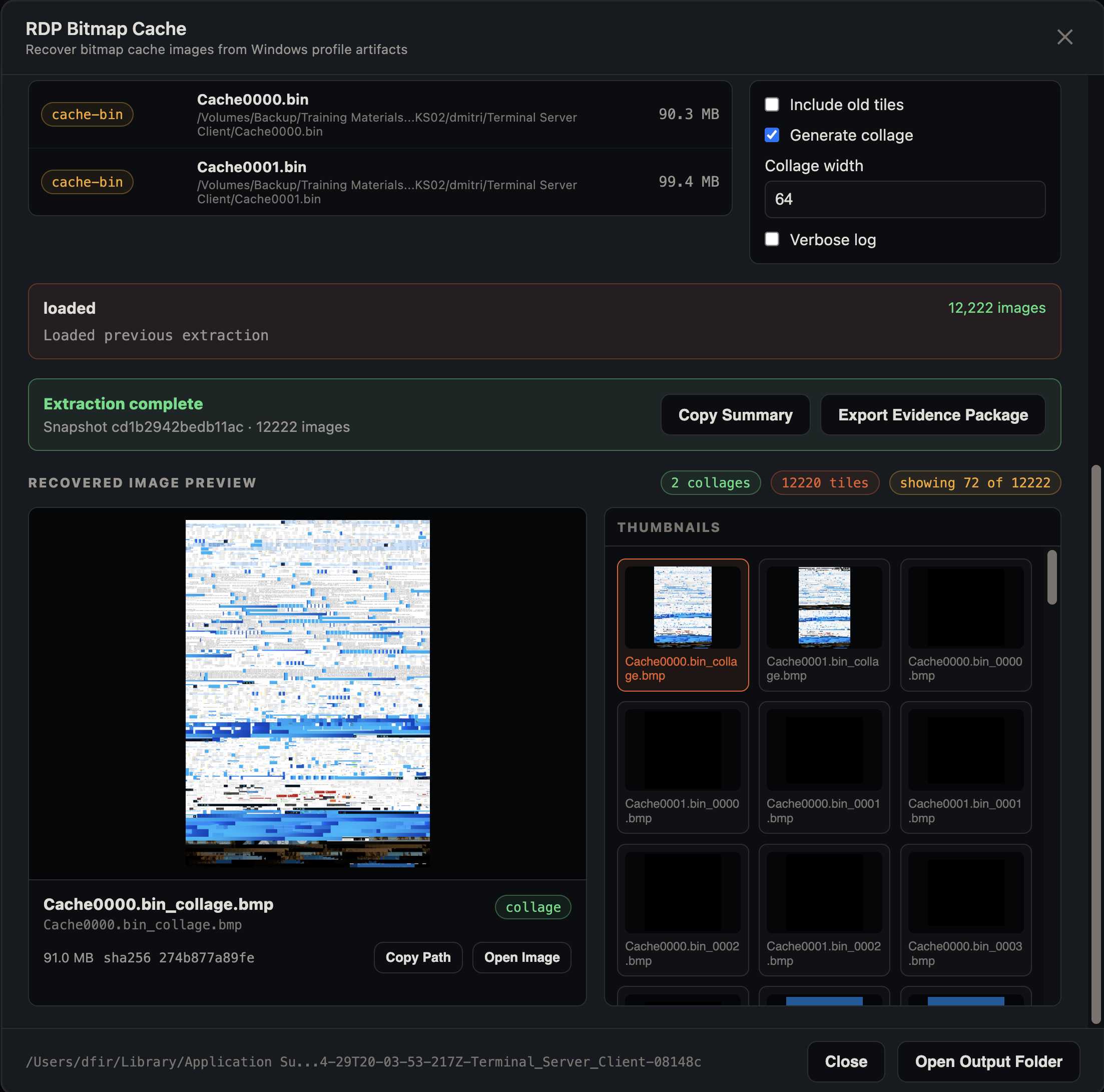
The extraction panel shows a snapshot hash and image count, and the preview separates collages (reconstructed full-cache mosaics) from individual tiles. Select any thumbnail to see its size, SHA-256, and Copy Path / Open Image actions, or use Open Output Folder to browse all recovered bitmaps on disk.
Evidence Package
After extraction, click Export Evidence Package to create an app-managed package folder containing:
manifest.jsonwith extraction metadata, source paths, command line, and hashesinput-files.csvwith source cache file metadata and SHA-256 hashesoutput-images.csvwith recovered image metadata and SHA-256 hashesimages/with copied recovered bitmap outputbmc-tools-command.txtwhen an exact command line was recordedREADME.txtdescribing the package contents
The original source cache files are not copied into the package. Their paths and hashes are preserved in the manifest and CSV inventory.
Build Notes
Release builds run:
npm run bundle:toolsThis bundles both Hayabusa and bmc-tools. To refresh only bmc-tools, run:
npm run bundle:bmc-toolsYou can pin a specific branch, tag, or commit:
npm run bundle:bmc-tools -- 5a4cad32be78b3b874aeec910cb478e04ba3501eAnalyst Notes
Bitmap cache output should be treated as recovered visual fragments, not a complete screen recording. Use it as supporting evidence alongside logon, RDP, process, and network telemetry.