Persistence Analyzer
The Persistence Analyzer scans imported EVTX timelines and registry exports (RECmd / Registry Explorer) for Windows persistence, scores each finding, clusters related events into incidents, and maps them to MITRE ATT&CK. It ships 72 built-in rules — 39 EVTX and 33 registry key-family — plus intent presets, per-technique toggles, custom rules, multi-source merge, and whole-collection KAPE scans.
Opening the Persistence Analyzer
- Menu: Tools → Platforms → Windows → Persistence Analyzer
- Home: Persistence Analyzer capability tile (when a tab is ready)
- Handoff from the Process Inspector detail panel (Persistence) with host + time already applied
Data Source Modes
The analyzer supports tab-level modes plus multi-source and whole-collection scans:
| Mode | Input Data | Best For |
|---|---|---|
| Auto-detect | Analyzes column names to determine type | Quick start — let the tool decide |
| EVTX Logs | EvtxECmd CSV or parsed EVTX output | Event-based persistence (services, tasks, WMI) |
| Registry Export | RECmd or other registry CSV output | Registry-based persistence (Run keys, COM hijacks, LSA) |
| Multi-source | Several open tabs in one run | Correlate EVTX + registry (or multiple hosts) without re-import |
| Analyze KAPE Collection | A KAPE output folder | Folder-level EVTX + registry discovery, incident clustering, and unread-artifact warnings |
In auto-detect mode, the analyzer examines your column headers to determine whether the data contains event log fields (EventId, Channel, Provider) or registry fields (KeyPath, ValueName, ValueData).
Multi-source and KAPE collection
- Multi-source — enable in the config panel and select other open tabs to merge. Formats are detected per tab so service-install events and RECmd rows can cluster into the same incident when they describe the same host/key.
- Analyze KAPE Collection — browse to a collection root; IRFlow scans for supported EVTX and registry exports, runs the matching rule packs, clusters findings into incidents, and reports coverage gaps (for example EVTX files present but not read). Prefer this when the evidence is still a folder rather than a single imported CSV.
Config phase
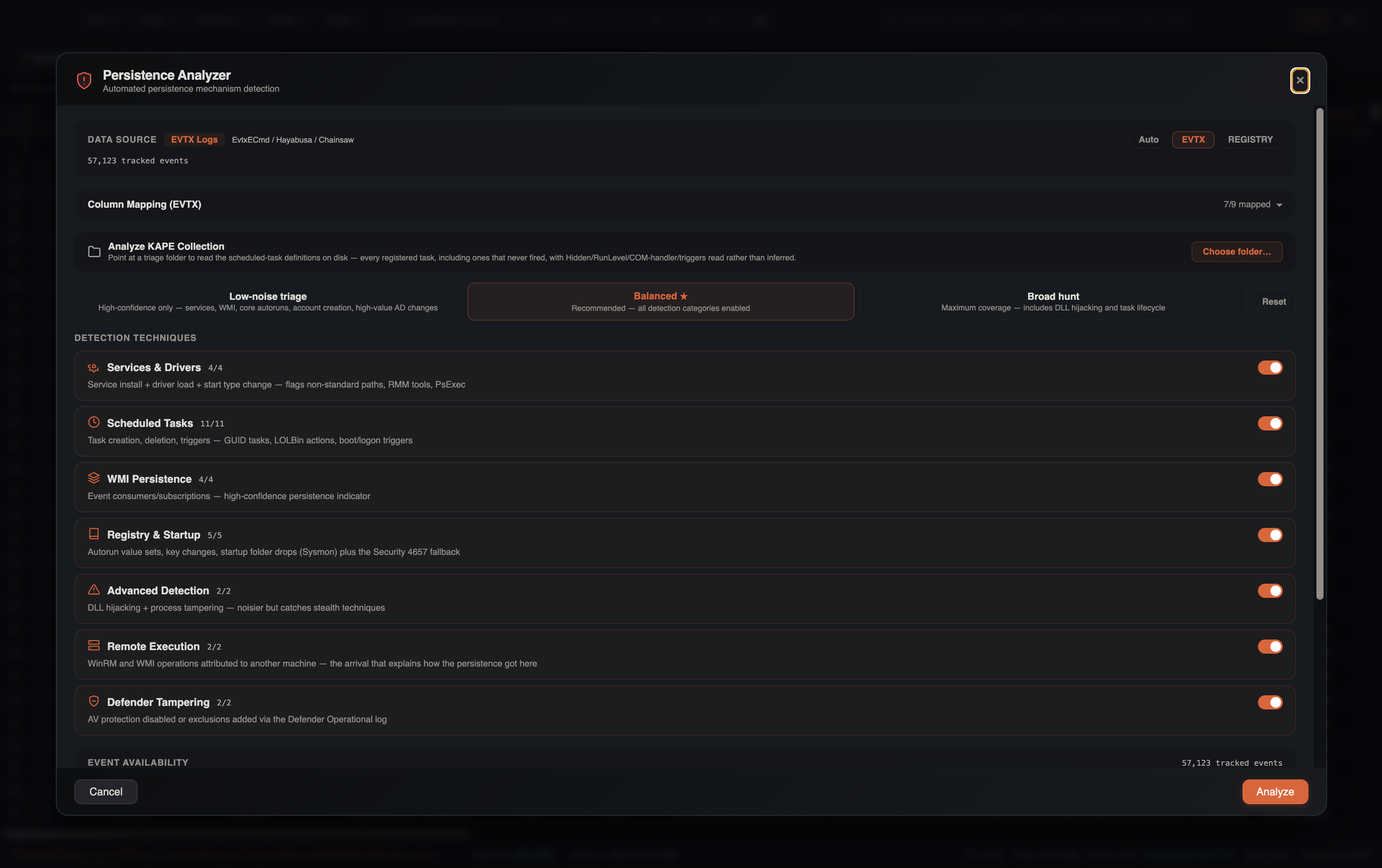
Before Analyze, the config panel shows:
- Data source — Auto / EVTX / Registry, with live tracked-event count
- Column mapping — auto-detected Event ID, Channel, Timestamp, Computer, User (or Key Path / Value Name / Value Data)
- Analyze KAPE Collection — point at a triage folder to read scheduled-task XML on disk (Hidden, RunLevel, COM handlers, triggers) rather than inferring them from events
- Multi-source Correlation — merge other open tabs (Security 4688, Sysmon 1/13, PowerShell 4104, hive exports) so a service install can be corroborated, not just observed
- Intent presets — Low-noise triage (high-confidence only), Balanced ★ (recommended), Broad hunt
- Detection Techniques — toggle whole groups (Services & Drivers, Scheduled Tasks, WMI, Registry & Startup, Advanced Detection, Remote Execution, Defender Tampering)
- Event Availability — which EIDs exist in this tab, how many events they contribute, and how many rules are in scope
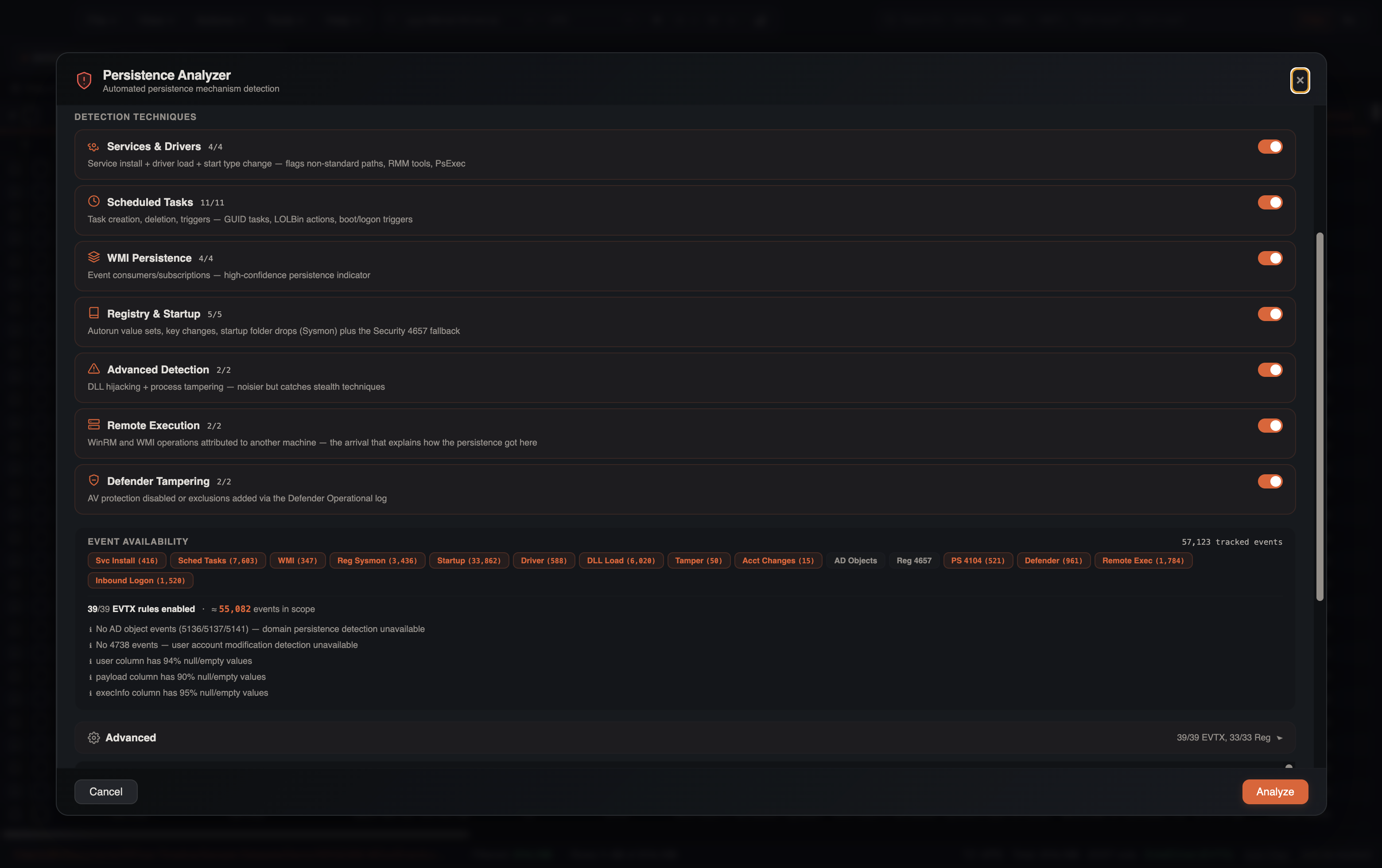
Advanced expands the per-rule list (enable/disable each evtx-* / reg-* detector with live event counts) and Add Custom Rule.
EVTX Detection Rules
When analyzing event logs, the Persistence Analyzer applies 39 EVTX rule definitions across multiple log channels:
Services
| Event ID | Source | Description |
|---|---|---|
| 7045 | System | New service installed |
| 4697 | Security | Service installed (auditing) |
| 7040 | System | Service start type changed |
Scheduled Tasks
| Event ID | Source | Description |
|---|---|---|
| 4698 | Security | Scheduled task created |
| 4699 | Security | Scheduled task deleted |
| 106 | Task Scheduler | Task registered |
| 129 | Task Scheduler | Task launch attempt |
| 118 | Task Scheduler | Boot trigger fired |
| 119 | Task Scheduler | Logon trigger fired |
| 140 | Task Scheduler | Task updated |
| 141 | Task Scheduler | Task deleted |
| 200 | Task Scheduler | Task action started |
| 4702 | Security | Task updated (Security) |
| TASKXML | On-disk task definition | Registered task XML from a KAPE/triage folder (including tasks that never fired) |
WMI Persistence
| Event ID | Source | Description |
|---|---|---|
| 5861 | WMI-Activity | WMI permanent event consumer registered |
| Sysmon 19 | Sysmon | WMI event filter created |
| Sysmon 20 | Sysmon | WMI event consumer created |
| Sysmon 21 | Sysmon | WMI filter-to-consumer binding |
Registry Indicators
| Event ID | Source | Category | Description |
|---|---|---|---|
| Sysmon 13 | Sysmon | Registry Autorun | Registry value set (autorun modifications) |
| Sysmon 12 | Sysmon | Registry Modification | Registry key created or deleted |
| Sysmon 14 | Sysmon | Registry Rename | Registry key or value renamed |
| 4657 | Security | Registry Autorun | Registry value modified (fallback when Sysmon 12/13/14 are absent) |
File System Indicators
| Event ID | Source | Category | Description |
|---|---|---|---|
| Sysmon 11 | Sysmon | Startup Folder | File created in startup directory |
| Sysmon 7 | Sysmon | DLL Hijacking | Unsigned or suspicious DLL loaded |
| Sysmon 6 | Sysmon | Driver Loading | Suspicious driver loaded |
| Sysmon 25 | Sysmon | Process Tampering | Process tampering detected |
Account Persistence
| Event ID | Source | Description |
|---|---|---|
| 4720 | Security | User account created |
| 4724 | Security | Password reset attempt |
| 4728 | Security | Member added to global security group |
| 4732 | Security | Member added to local security group |
| 4756 | Security | Member added to universal security group |
| 4738 | Security | User account changed |
Domain Persistence
| Event ID | Source | Description |
|---|---|---|
| 5136 | Security | AD object modified |
| 5137 | Security | AD object created |
| 5141 | Security | AD object deleted |
Defender Tampering
| Event ID | Source | Description |
|---|---|---|
| 5001, 5010, 5012, 5101 | Defender Operational | Protection disabled / exclusions |
| 5007 | Defender Operational | Defender setting changed |
Remote Execution (how persistence arrived)
| Event ID | Source | Description |
|---|---|---|
| 5857, 5858, 5860 | WMI-Activity | WMI remote operation |
| 145, 161, 169 | WinRM | WinRM remote session |
Registry Detection Rules
When analyzing registry exports, the analyzer applies 33 registry key-family rules. Representative families include:
| Family | Examples | Technique |
|---|---|---|
| Run / RunOnce | ...\CurrentVersion\Run, RunOnce, Policies\Explorer\Run | Autostart execution |
| Services | ...\Services\*\ImagePath, ServiceDll | Service DLL/binary |
| Winlogon / LSA | Shell, Userinit, Notify, Security/Authentication packages | Logon / credential interception |
| IFEO / AppInit / AppCert | Debugger hijack, AppInit_DLLs, AppCertDlls | DLL injection / API hooking |
| COM / Shell / BHO | InprocServer32, shell handlers, Browser Helper Objects | COM / Explorer persistence |
| Boot / Session Manager | BootExecute, SetupExecute | Pre-logon execution |
| Tasks / GPO / Network | TaskCache, Group Policy scripts, NetworkProvider\Order | Scheduled / logon scripts |
| Defender tampering | Exclusions, real-time protection disabled | AV weakening (T1562.001) |
Additional rules cover screensaver hijack, Office add-ins, time providers, terminal-server InitialProgram, file-association hijacks, environment/COR_PROFILER abuse, and related DFIR-relevant paths. Each built-in registry rule can be toggled in the Detection Rules panel.
Custom Rules Editor
The configuration panel includes a collapsible Detection Rules section where you can manage both built-in and custom rules.
Managing Built-in Rules
Each built-in EVTX and registry rule has a checkbox toggle. Disable rules that generate noise for your specific environment without removing them. Disabled rules are skipped during analysis.
Creating Custom Rules
Click Add Custom Rule to create a new detection rule:
EVTX custom rules:
| Field | Description |
|---|---|
| Category | Grouping label shown in results (e.g., "Custom Persistence") |
| Rule Name | Descriptive name for the detection |
| Event IDs | Comma-separated list of Windows Event IDs to match |
| Channels | Comma-separated log channels to filter (optional) |
| Payload Regex | Regular expression to filter on event payload content (optional) |
| Severity | Critical, High, Medium, or Low |
Registry custom rules:
| Field | Description |
|---|---|
| Category | Grouping label shown in results |
| Rule Name | Descriptive name for the detection |
| Key Path Pattern | Regex matching the registry key path |
| Value Name Filter | Regex filtering the value name (optional) |
| Severity | Critical, High, Medium, or Low |
Custom rules are evaluated alongside built-in rules and appear in results with the same scoring and filtering behavior.
Risk Scoring
Each detected persistence mechanism receives a risk score on a 0-10 scale. The score is calculated from:
- Base severity -- determined by the persistence technique category (e.g., WMI subscriptions score higher than Run keys)
- Suspicious path indicators -- execution from
\Temp\,\AppData\,\Downloads\, or\ProgramData\increases the score - Suspicious commands -- presence of
powershell,cmd.exe, encoded commands, or known LOLBins raises the score - Encoding and download cradle detection -- Base64-encoded command lines, obfuscated payloads, or PowerShell download cradles (
iex,Invoke-Expression,DownloadString,WebClient,BITSTransfer) add to the score
Severity Levels
| Level | Score Range | Color |
|---|---|---|
| Critical | 9-10 | Red |
| High | 6-8 | Orange |
| Medium | 3-5 | Yellow |
| Low | 0-2 | Gray |
Suspicious Detection Badges
Beyond the numeric risk score, findings can receive a red SUSPICIOUS badge when specific behavioral patterns are detected:
| Detection | Trigger |
|---|---|
| Non-standard task path | Task name doesn't start with a known-good prefix (\Microsoft\, \Google\, etc.) |
| GUID-named task | Task name is a bare GUID (e.g., \{6D3B4F8C-1234-...}) — often used by malware to blend in |
| LOLBin execution | Command uses powershell, cmd.exe, mshta, wscript, or cscript in a non-Microsoft task or service |
| User-writable path | Executable runs from \Users\, \Temp\, \AppData\, \Downloads\, or \Public\ |
| Non-standard task deleted | Event ID 141 for a non-Microsoft task — potential anti-forensics indicator |
| Browser mimicry | Service uses a browser name (Chrome, Edge, Firefox) but runs from a non-standard path |
RMM Tool Detection
Service installations (Event ID 7045) matching known Remote Monitoring and Management tool names are flagged with an orange RMM badge. Detected tools include:
AnyDesk, Splashtop, RustDesk, Atera, ScreenConnect, TeamViewer, Supremo, ConnectWise, Bomgar, LogMeIn
RMM tools are not inherently malicious, but they are high-confidence indicators in ransomware and unauthorized access investigations. The badge helps analysts quickly identify remote access tooling in the environment.
AV/EDR and Browser Whitelisting
The analyzer automatically suppresses known-legitimate findings to reduce noise:
- AV/EDR vendors — Service installations from 15 vendors (Cortex XDR, Microsoft Defender, CrowdStrike, SentinelOne, Carbon Black, Sophos, Symantec, McAfee/Trellix, Kaspersky, ESET, Trend Micro, Bitdefender, Cylance, Elastic, Fortinet) are suppressed when they match expected installation paths
- Browser update services — Chrome, Edge, Firefox, Brave, Opera, and Vivaldi update services from expected
Program Filespaths are downgraded to low severity
This whitelisting prevents hundreds of false-positive service events from cluttering results while preserving detection of the same service names running from unexpected paths (flagged as browser mimicry).
Results Interface
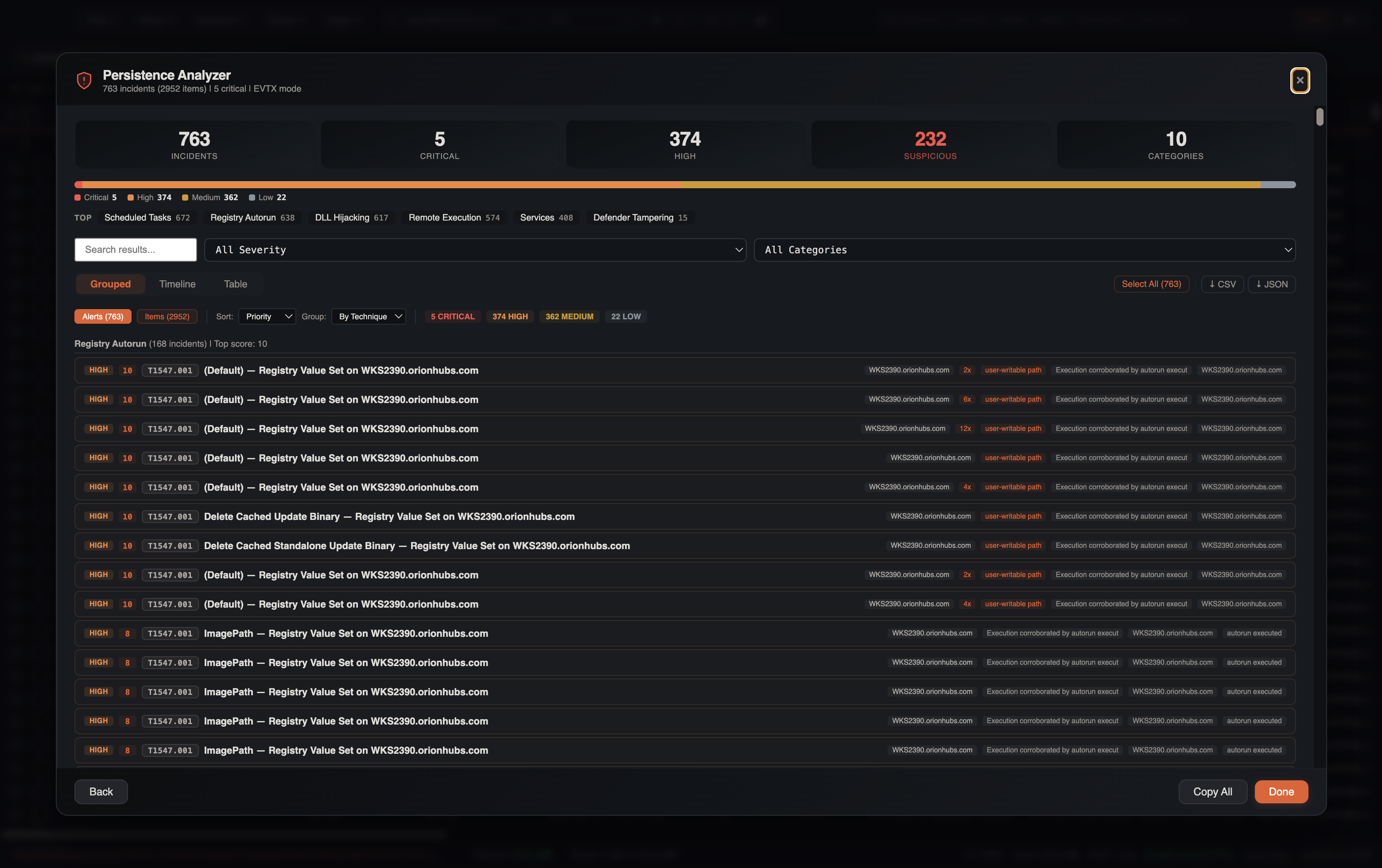
After the scan completes, the hero cards show:
- Incidents (Alerts) or Total found (Items)
- Critical / High
- Suspicious — findings with behavioral badges
- Categories
A severity bar and Top category chips (Scheduled Tasks, Registry Autorun, DLL Hijacking, Remote Execution, Services, Defender Tampering, …) sit under the cards. Click a chip to filter.
When a KAPE folder or multi-source merge contributed, a Collection / Merged provenance banner states what was read. If inbound logons can be joined, a Remotely planted banner lists findings tied to a source host/IP/logon session (the join key into Lateral Movement).
Filtering Results
- Search — full-text across findings
- Severity — Critical / High / Medium / Low
- Category — Services, Scheduled Tasks, WMI, Registry Autorun, DLL Hijacking, …
- Sort — Priority, Severity, Recency, Events
- Group (Alerts) — By Incident, By Host, By Technique, By Artifact
View modes
| Mode | What you see |
|---|---|
| Grouped → Alerts | Clustered incidents (title, MITRE, evidence pills, occurrence count) |
| Grouped → Items | Flat list of every matching event |
| Timeline | Analyst modes Triage / Hunt / Chronology plus category pills |
| Table | Analyst modes Triage / Review / Raw, optional Hide Expected |
Grouped — Alerts
Incidents are the default. Related events collapse into one card (for example the same Run-key value set 12 times). Group by Technique to walk T1547.001, T1053.005, T1055, … in score order.
Expand a card for artifact/command, time range, suspicious-reason badges, evidence pills, raw fields, and pivots: Filter Artifact, Filter Host, Filter Related, Open in Timeline, Copy IOC.
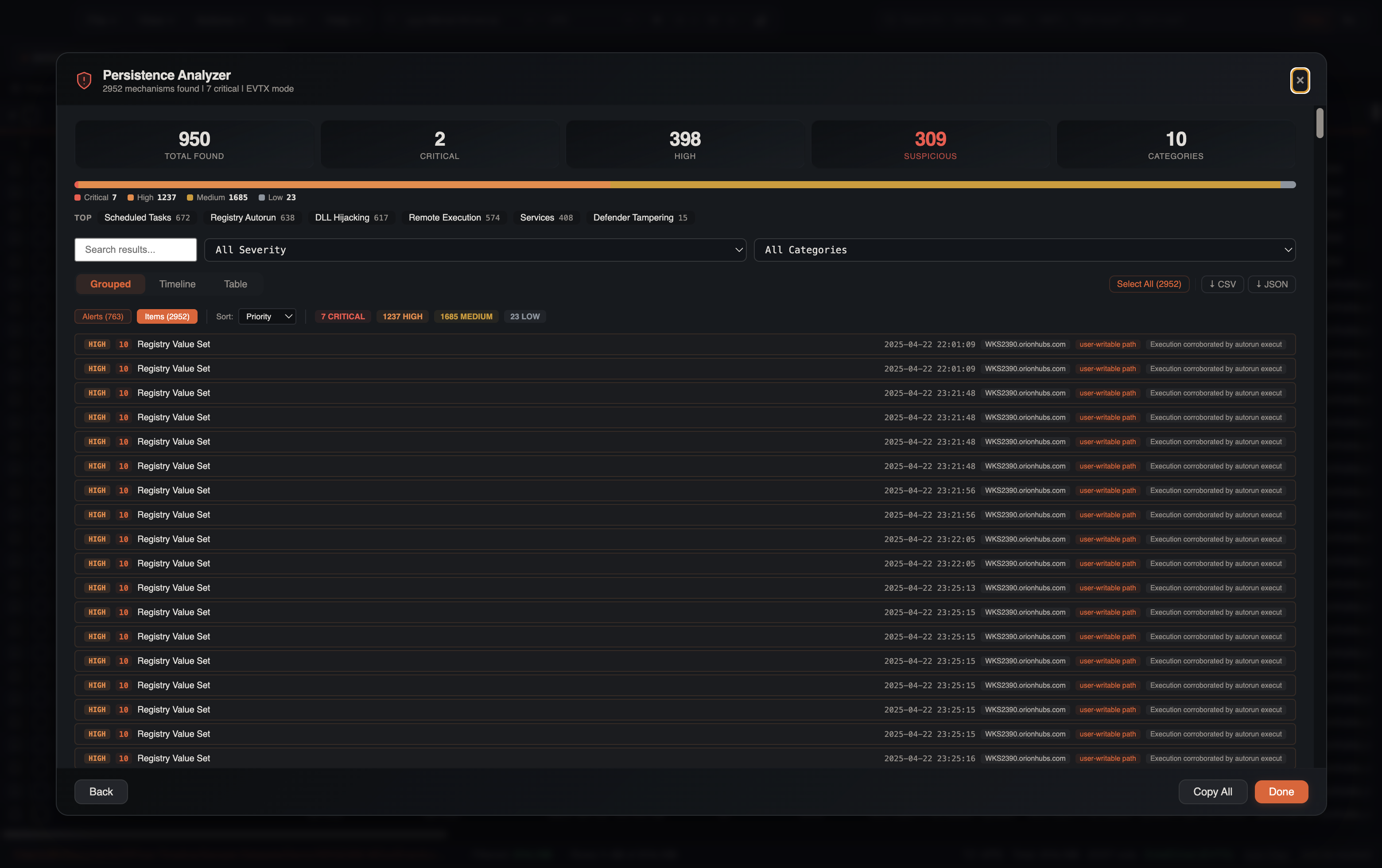
Grouped — Items
Every matching event, risk-sorted. Use this when you need the raw 7045 / Sysmon 13 / 129 rows rather than the clustered story.
Timeline
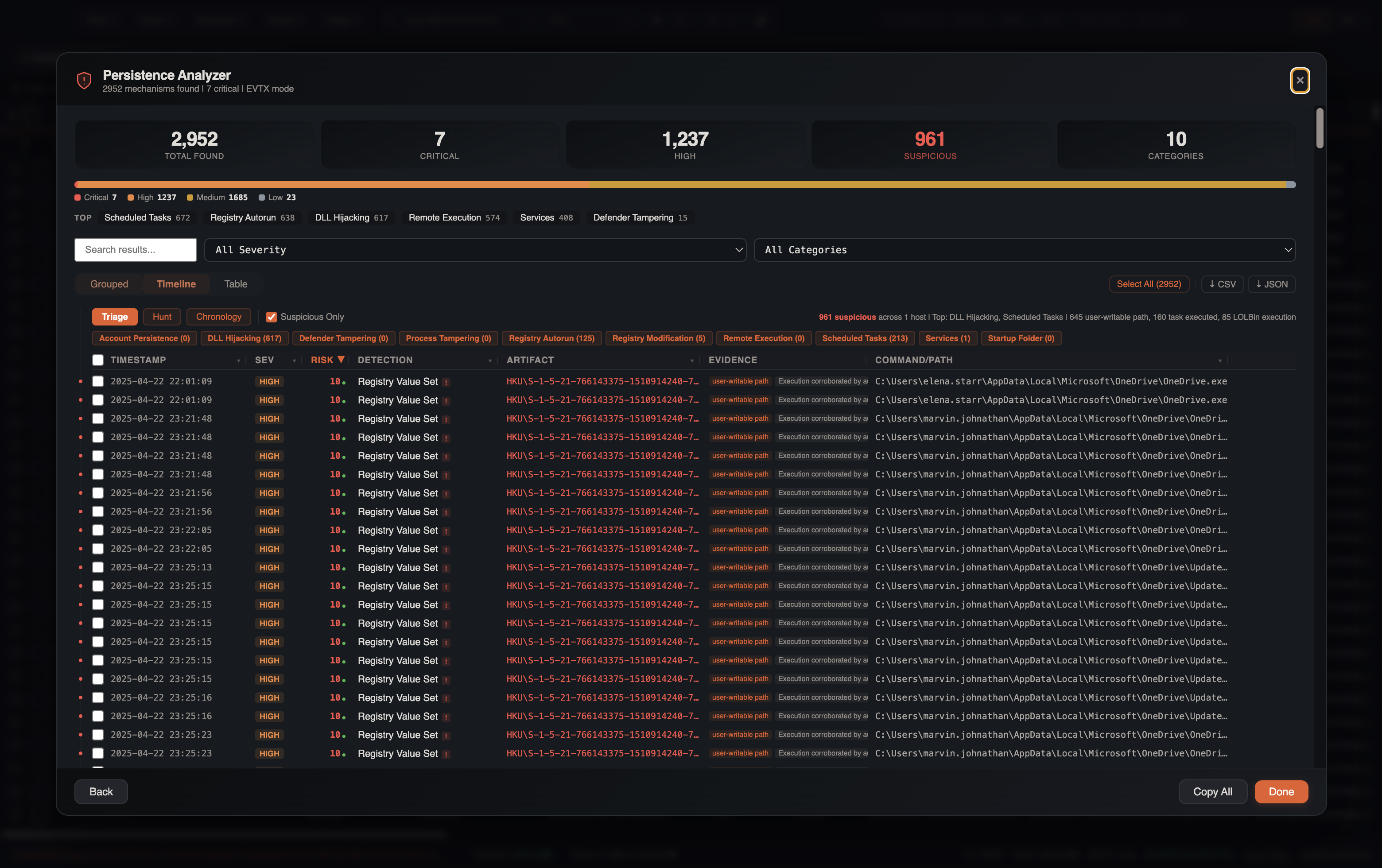
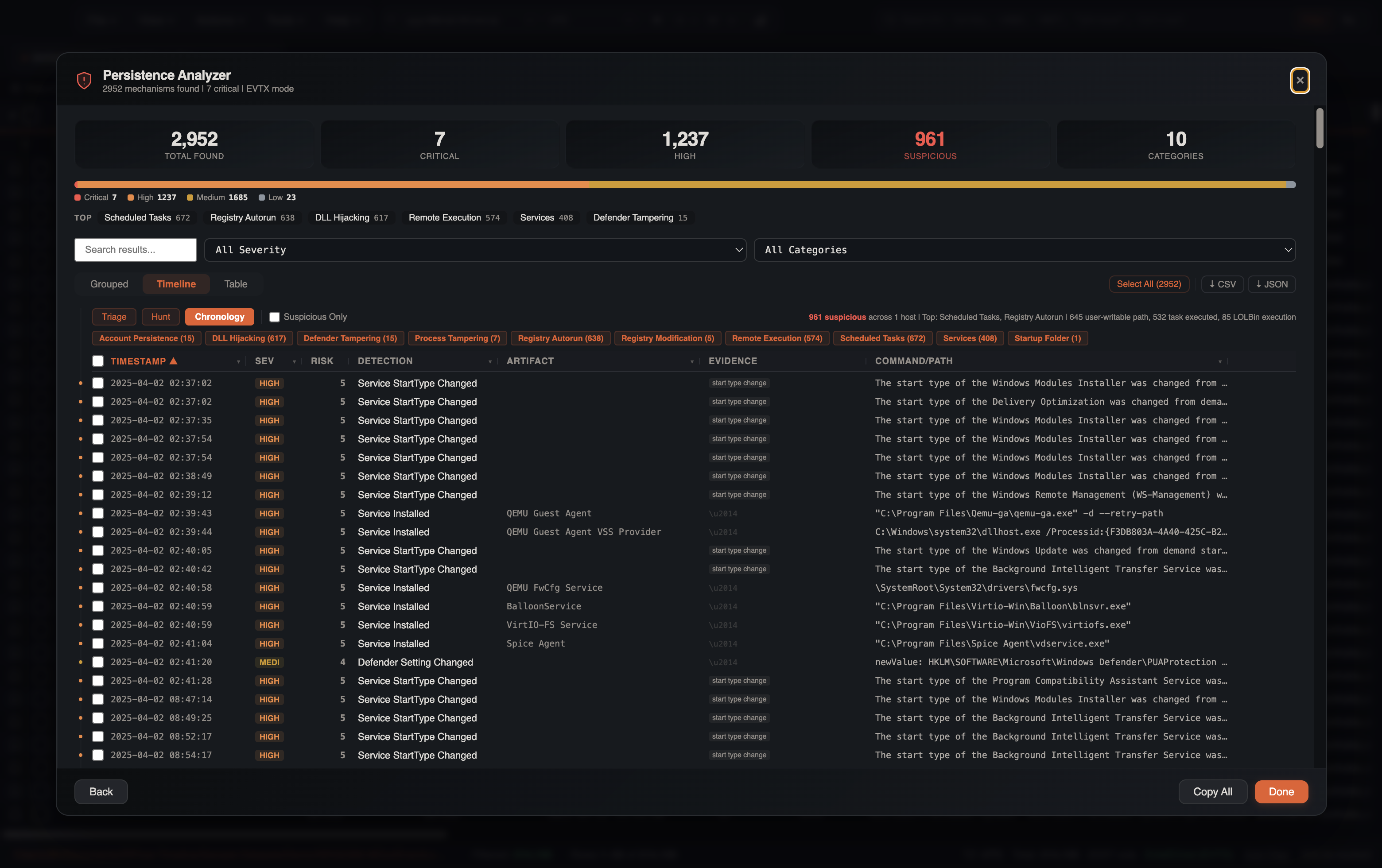
Three analyst modes:
| Mode | Default |
|---|---|
| Triage | Suspicious only, risk-sorted |
| Hunt | Medium+ severity, risk-sorted |
| Chronology | All items, time-sorted |
Category pills (Account Persistence, DLL Hijacking, Defender Tampering, Registry Autorun, Scheduled Tasks, Services, …) facet the list. Consecutive low-risk repeats collapse into streaks.
Table
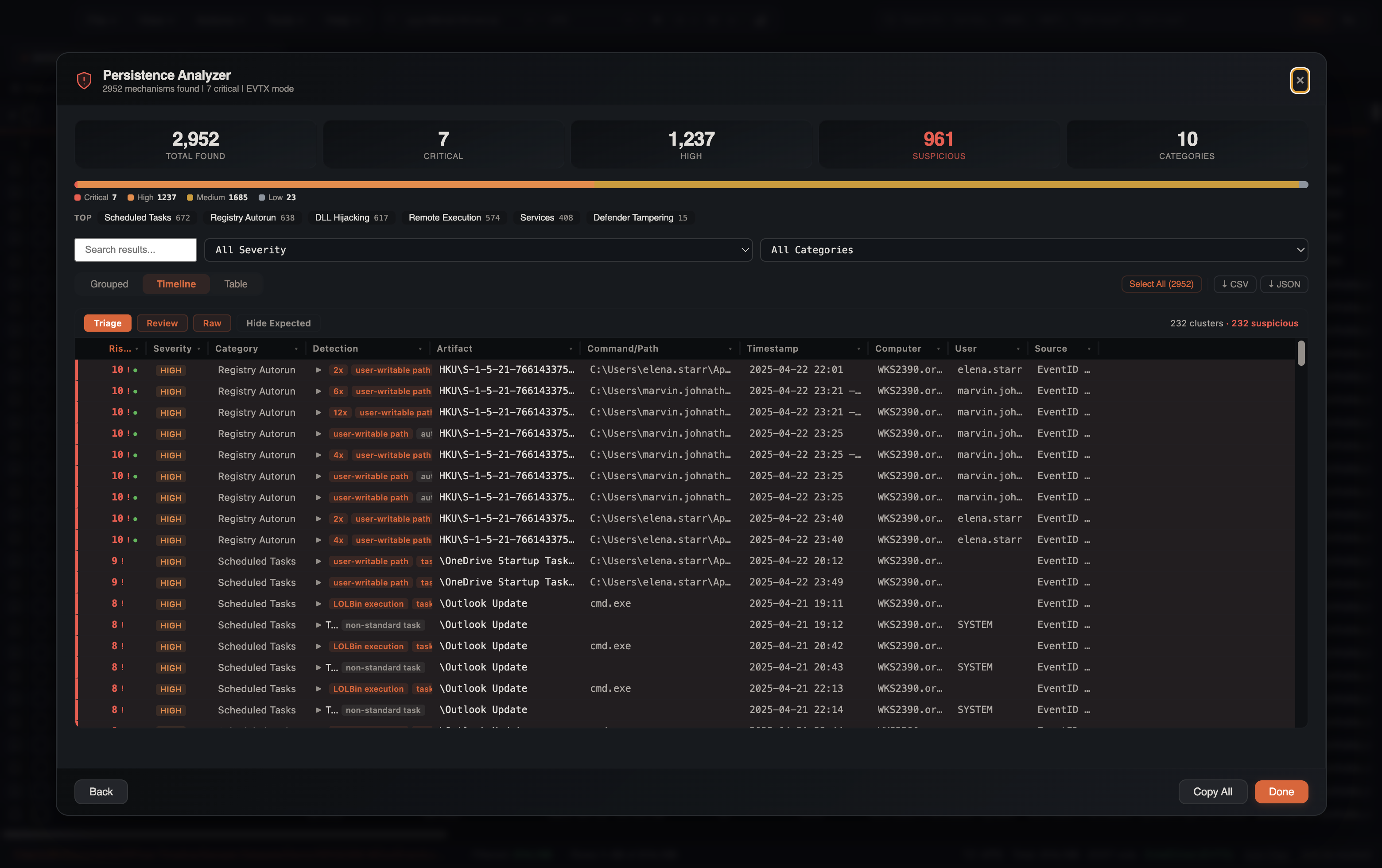
Triage / Review / Raw with sortable columns (Risk, Severity, Category, Detection, Artifact, Command/Path, Timestamp, Computer, User, Source). Hide Expected drops AV/EDR and other allowlisted noise. Collapse mode dedupes into clusters (Outlook Update + LOLBin cmd.exe is the interesting cluster on WKS2390).
Item Details
Click any finding to expand:
- Full registry path or event log entry
- Command line or executable path
- Timestamp, user, source host
- Risk score and suspicious-reason badges
- Evidence pills (execution corroboration, user-writable path, LOLBin, non-standard task, RMM)
- Filter Artifact / Host / Related, Open in Timeline, Copy IOC
Bulk Operations
Use the checkbox selection to select multiple findings for:
- Bulk tagging in the source timeline
- Filtering the source tab to selected items
- Exporting selected findings (↓ CSV / ↓ JSON)
Cross-Event Correlation
The analyzer automatically correlates related events. For example:
- A scheduled task creation (Event ID 4698) is enriched with the task executable extracted from the XML task definition
- Service installations (Event ID 7045) are correlated with their
ImagePathto identify the binary - WMI subscriptions link filter, consumer, and binding events into a single finding
Filter Awareness
The Persistence Analyzer respects all active filters on the source tab:
- Column filters
- Checkbox filters
- Search terms
- Date range filters
- Bookmark filter
- Advanced filters
This means you can narrow your timeline to a specific time window or host before running the analysis, focusing results on the scope that matters.
Investigation Tips
Start with Auto-Detect
Let the analyzer auto-detect your data mode. It correctly identifies EVTX vs registry data in most cases and saves configuration time.
Start in Timeline Triage, then Chronology
Triage is suspicious-only and risk-sorted. Flip to Chronology once you know what landed and need when (service start-type changes, then the 7045, then the task).
Focus on Critical and High
Sort by severity and start with critical/high findings. Low-severity items often represent legitimate system services and can be reviewed later if needed.
Check the SUSPICIOUS Badge
Findings with the red SUSPICIOUS badge deserve immediate attention. GUID-named tasks, LOLBin execution from non-Microsoft services, and anti-forensics task deletion are strong indicators of compromise.
RMM Tools in Ransomware Cases
In ransomware investigations, check the RMM-tagged findings first. Threat actors commonly deploy AnyDesk, ScreenConnect, or Splashtop for persistent remote access before deploying ransomware.
Combine with Process Inspector
After identifying a suspicious persistence mechanism, use the Process Inspector to trace what process installed it and what the persisted binary spawns on execution.
Correlate with Lateral Movement
Persistence is often installed after lateral movement. Cross-reference persistence timestamps with the Lateral Movement Tracker to identify which hop preceded each persistence installation.
See Also
- Process Inspector — trace what process installed each persistence mechanism
- Lateral Movement Tracker — correlate persistence with lateral movement hops
- IOC Matching — match persisted executables and registry paths against threat intel
- Gap & Burst Analysis — identify when persistence was installed relative to other activity