
NTFS Analysis
IRFlow Timeline includes six specialized tools for analyzing raw NTFS artifacts — $MFT and $J (USN Journal) files — directly, without requiring pre-processing through MFTECmd or other tools. These tools surface forensic evidence that is difficult to extract from parsed CSV output alone.
Supported Formats
| Artifact | Extensions | Description |
|---|---|---|
| $MFT | .mft | Raw Master File Table from NTFS volumes |
| $J | .$J, .usn | Raw USN Journal (change journal) |
Both formats are imported as regular tabs and are available alongside CSV, EVTX, XLSX, and Plaso timelines. Once imported, open Tools → Platforms → Windows and use the Master File Table or USN Journal submenus for the tools below.
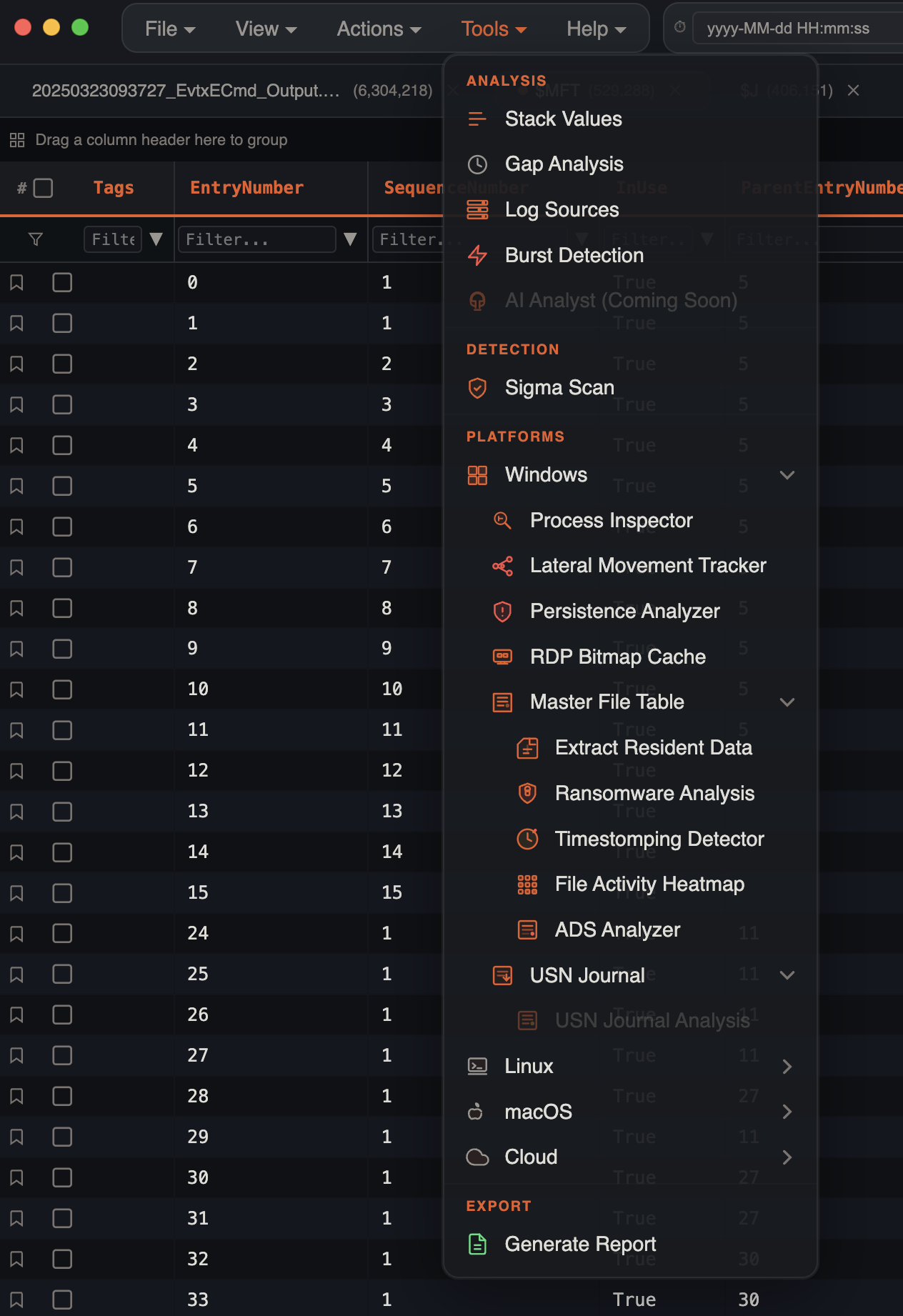
Ransomware Analysis
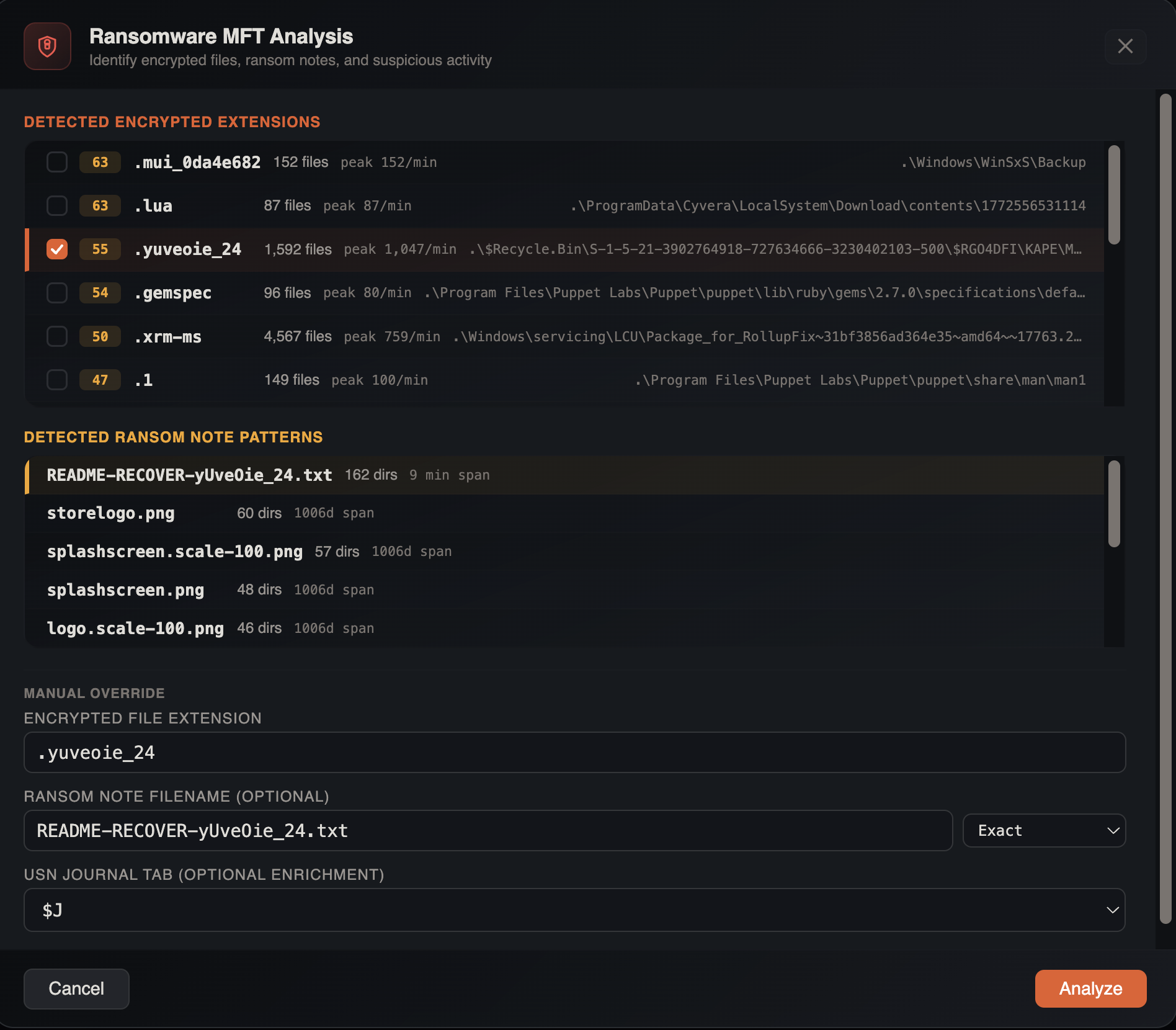
Scans MFT records for indicators of ransomware activity — encrypted file extensions, ransom notes, and timing patterns that reveal the encryption timeline.
How to Use
- Import a raw
$MFTfile - Open Tools → Platforms → Windows → Master File Table → Ransomware Analysis
- Configure analysis parameters:
- Encrypted extension — the ransomware file extension to scan for (e.g.,
.locked,.encrypted,.ryuk) - Ransom note pattern — filename pattern for ransom notes (e.g.,
README,DECRYPT,RECOVER) - Match mode — contains, exact, or regex
- USN cross-reference — optionally select an imported
$Jtab for enrichment
- Encrypted extension — the ransomware file extension to scan for (e.g.,
Results
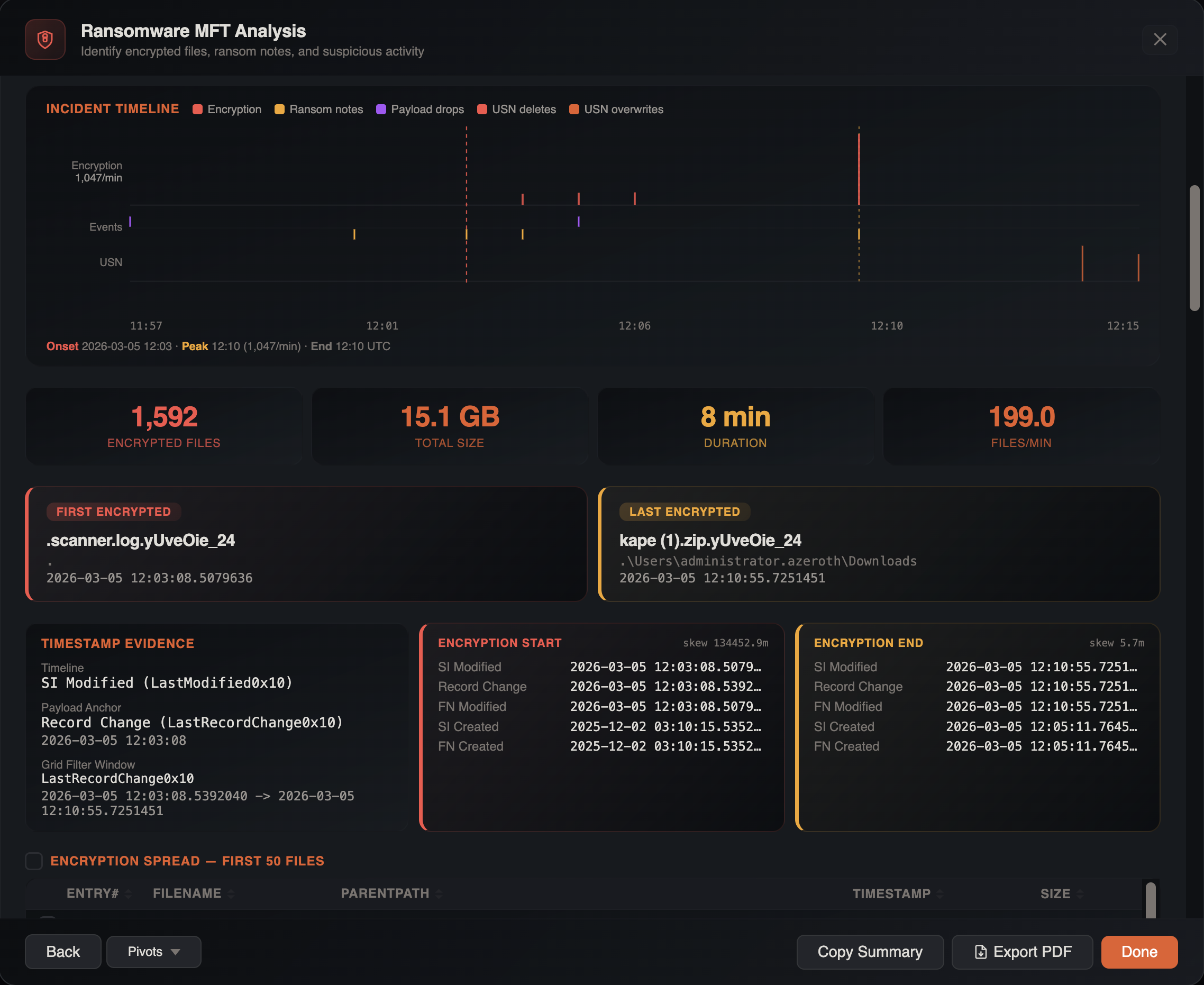
| Metric | Description |
|---|---|
| Encrypted count | Total files matching the ransomware extension |
| Total size | Combined size of encrypted files |
| First / Last encrypted | Timestamp range of encryption activity |
| Duration | Time span of the encryption event |
| Files per minute | Encryption velocity |
| Ransom notes | Detected ransom note files with paths |
| Top directories | Most-affected directory paths |
| Timestomped count | Encrypted files with timestamp anomalies |
| Suspicious files | Files with unusual characteristics (e.g., executables in temp paths) |
When a USN Journal tab is cross-referenced, the analysis correlates rename, overwrite, and delete events within a 5-minute window of encryption activity, providing timing evidence for the attack sequence.
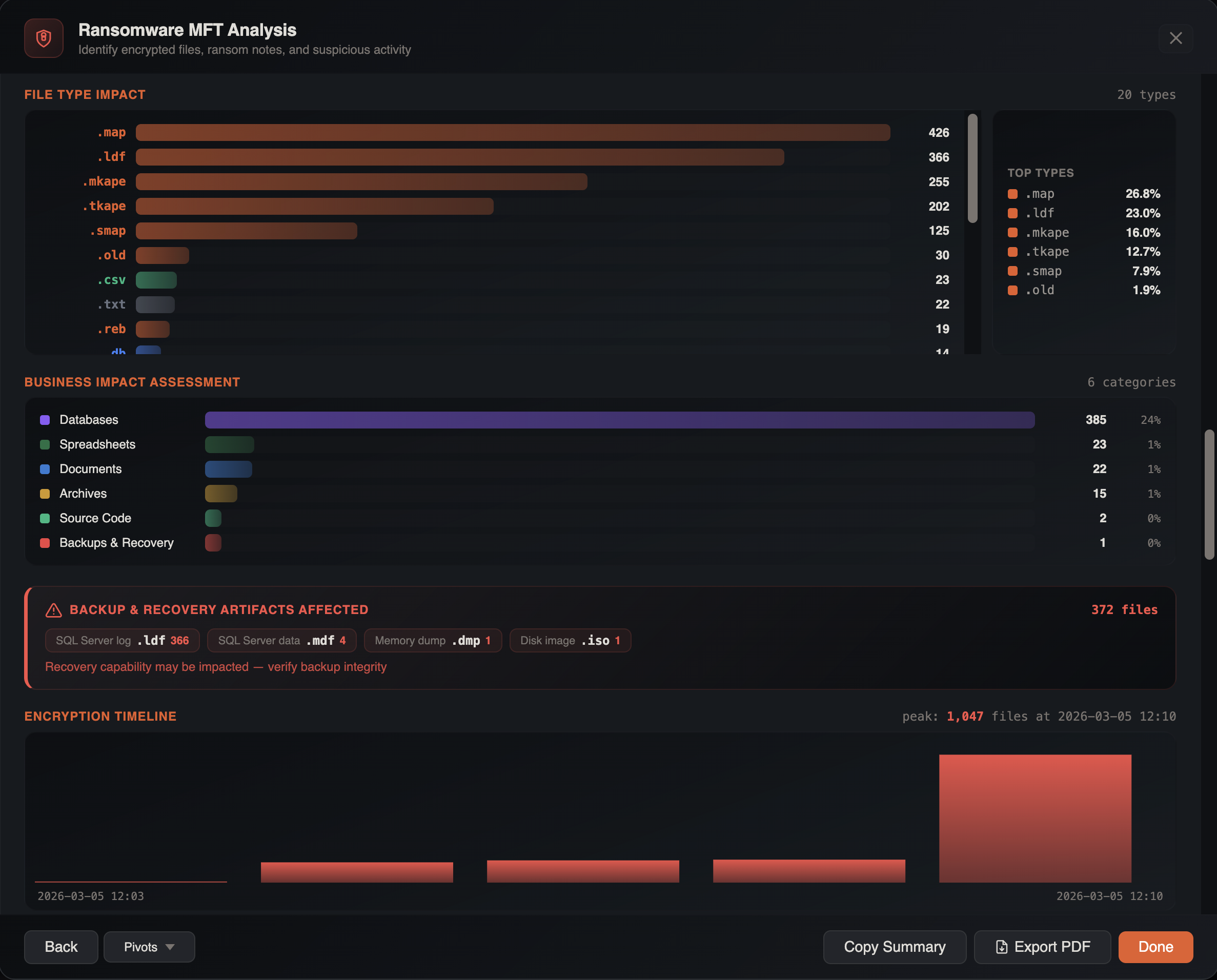
PDF Export
Click Export PDF to generate a formatted ransomware analysis report including all metrics, timelines, and directory breakdowns.
Timestomping Detection
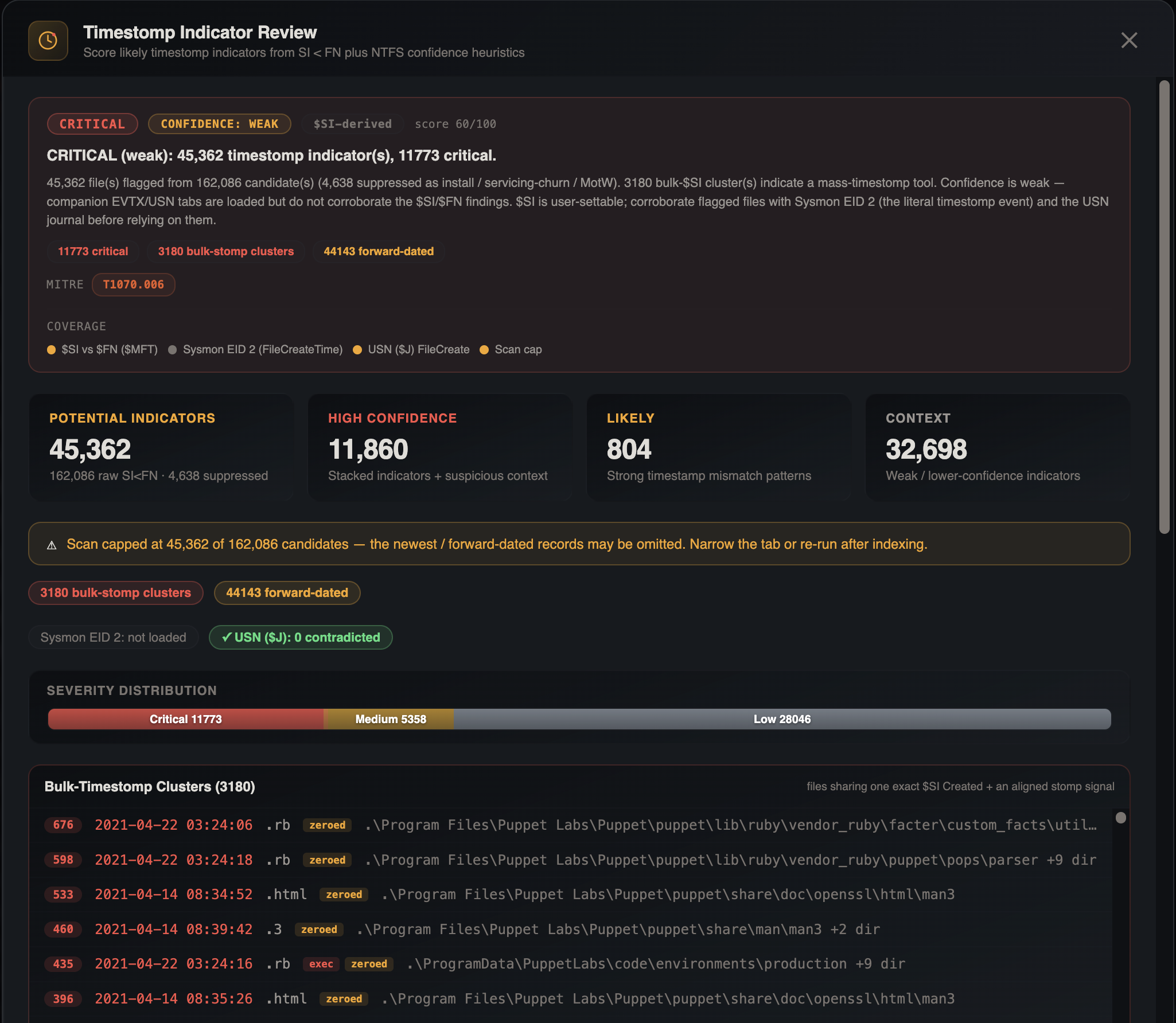
Detects files where $STANDARD_INFORMATION timestamps have been manipulated by comparing them against the immutable $FILE_NAME timestamps in MFT records.
Open via Tools → Platforms → Windows → Master File Table → Timestomping Detector after importing a raw $MFT tab with SI/FN timestamp columns.
Detection Logic
A file is flagged as timestomped when:
$SICreated/Modified timestamps predate the corresponding$FNtimestamps- The delta between SI and FN exceeds a threshold indicating manual manipulation
- Files with
uSecZeros(zeroed sub-second precision) are flagged — a common artifact of timestomping tools - Files with the
Copiedflag set are evaluated separately
Results
| Field | Description |
|---|---|
| Total timestomped | Files with confirmed timestamp anomalies |
| Raw SI vs FN count | Total SI-predates-FN detections before suppression |
| Suppressed count | Known-safe files filtered out (e.g., system files) |
Each detection includes the file path, both SI and FN timestamps, the delta, and a severity score based on the magnitude of the discrepancy and file type.
Timestomped files are auto-tagged with Timestomp Indicator for filtering and reporting.
File Activity Heatmap
Visualizes MFT file creation and modification activity as a calendar heatmap, revealing temporal patterns in filesystem activity.
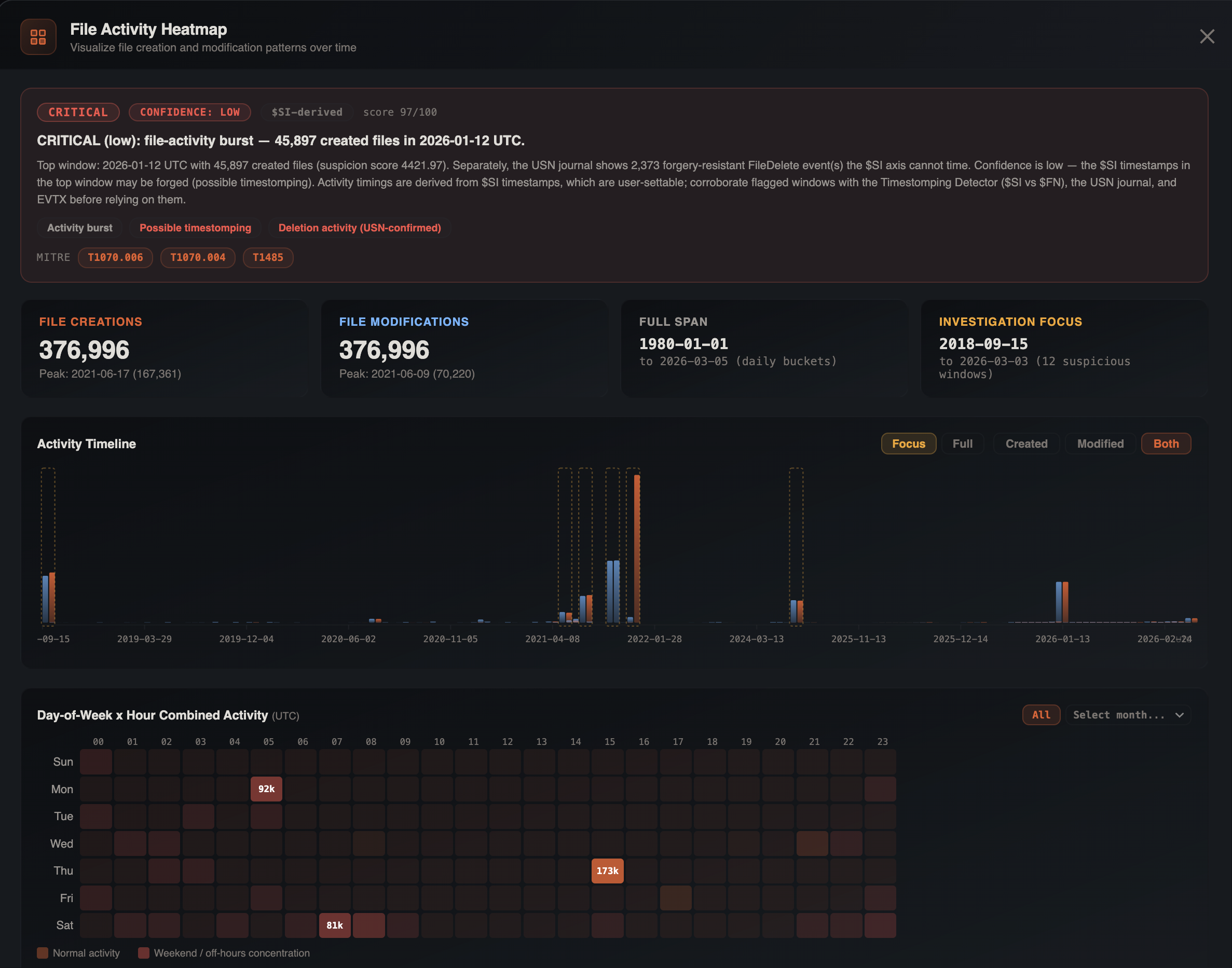
Open via Tools → Platforms → Windows → Master File Table → File Activity Heatmap after importing a raw $MFT tab.
Visualizations
- Hourly buckets — file creation and modification counts per hour across the dataset timespan
- Daily buckets — activity aggregated by calendar day
- Day-of-week × Hour matrix — a 7×24 heatmap showing which day/hour combinations have the most filesystem activity
This is useful for identifying after-hours activity, automated processes (consistent daily patterns), and burst events like ransomware encryption or bulk data staging.
ADS Analyzer
Scans MFT records for Alternate Data Streams (ADS), which attackers use to hide data, store payloads, or bypass detection.
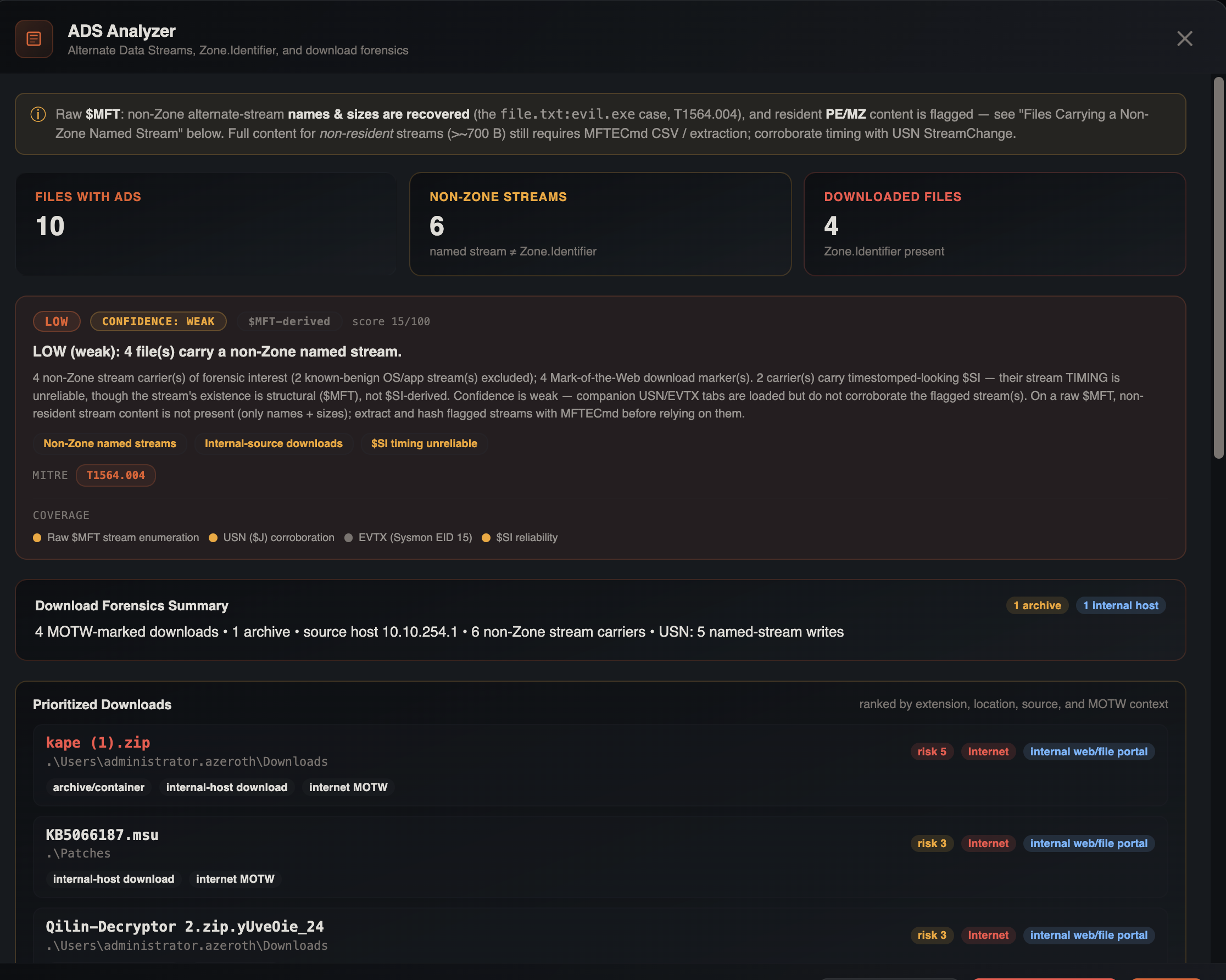
Open via Tools → Platforms → Windows → Master File Table → ADS Analyzer after importing a raw $MFT tab with ADS-related columns.
What It Detects
| Category | Description |
|---|---|
| Zone.Identifier | Files downloaded from the internet — extracts referrer URLs, host URLs, and zone IDs from the ADS metadata |
| Suspicious ADS | Non-standard alternate data streams that may contain hidden data |
| Executable ADS | ADS entries with executable content or suspicious naming |
The analyzer uses the HasAds, IsAds, and ZoneIdContents columns from MFT data to classify each ADS entry.
Downloaded files identified through Zone.Identifier ADS are auto-tagged with Downloaded for filtering.
USN Journal Analysis
The USN (Update Sequence Number) Journal records every change to files and directories on an NTFS volume. This tool performs 11 targeted forensic analyses on raw $J data with full path reconstruction powered by the UsnJrnl Rewind methodology.
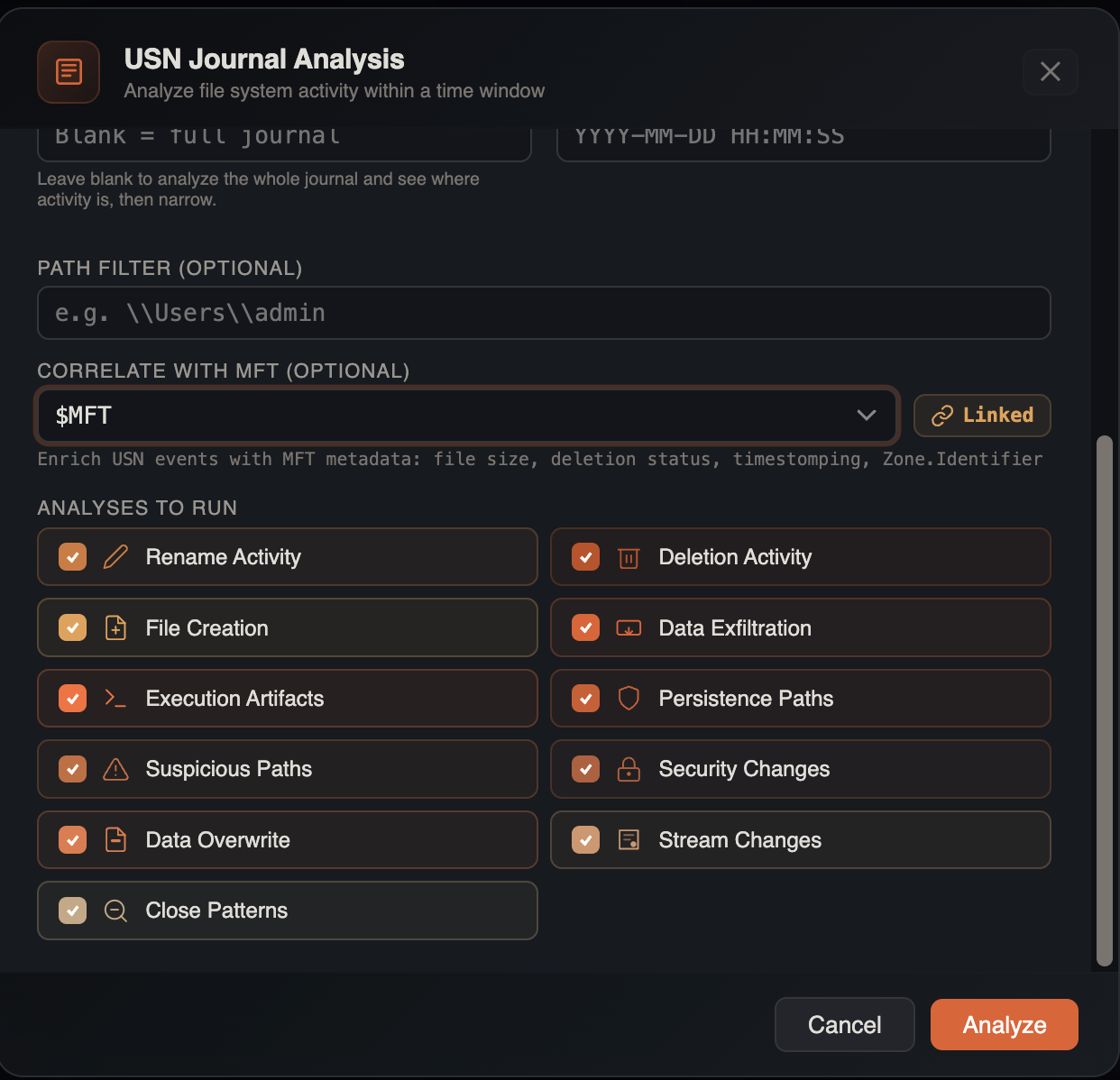
Open via Tools → Platforms → Windows → USN Journal → USN Journal Analysis after importing a raw $J tab.
Setup
UsnJrnl Rewind Path Resolution
A core challenge with USN Journal analysis is that most tools show "UNKNOWN" paths for deleted files — because the parent MFT entries have been overwritten or reallocated by the time you acquire the image. IRFlow Timeline integrates the UsnJrnl Rewind methodology (originally published by CyberCX) to solve this.
Rather than matching parent references against the current MFT state, UsnJrnl Rewind processes journal records in reverse chronological order, maintaining stateful information about every filesystem entry. This rebuilds parent-child relationships from the journal itself, reconstructing full paths for files and folders even when:
- The parent directory has been deleted
- MFT entries have been reallocated multiple times
- The threat actor cleaned up staging directories after the operation
The result: complete path context for every USN Journal entry, where conventional tools would show orphaned file references with no directory information.
When an $MFT tab is also loaded, IRFlow Timeline combines both resolution methods — journal-based rewind and MFT parent reference chain-walking — for maximum path coverage.
Analysis Categories
| Category | What It Finds |
|---|---|
| Renames | File rename operations — reveals extension changes, obfuscation attempts, and ransomware encryption patterns |
| Deletions | Deleted files and directories — tracks evidence destruction and cleanup activity |
| Creations | Newly created files — identifies dropped payloads, tools, and staging artifacts |
| Exfiltration | Patterns consistent with data collection and staging (archive creation, bulk file access) |
| Execution | Evidence of program execution from USN perspective (prefetch creation, .pf file activity) |
| Persistence | Changes to autorun locations, scheduled tasks, services, and startup folders |
| Suspicious paths | Activity in temp directories, recycle bin, hidden folders, and other paths commonly used by malware |
| Security changes | ACL modifications, permission changes, and security descriptor updates |
| Data overwrite | File content overwrites — distinguishes in-place modification from create-delete cycles |
| Stream changes | ADS creation, modification, and deletion events |
| Close patterns | File close events with analysis of access patterns and file lifecycle |
Filtering Options
- Time range — restrict analysis to a specific start and end time
- Path filter — focus on a directory subtree
- MFT cross-reference — select an imported
$MFTtab to enrich USN entries with full file paths via MFT parent reference chain-walking (combined with journal-based rewind for maximum coverage)
Results
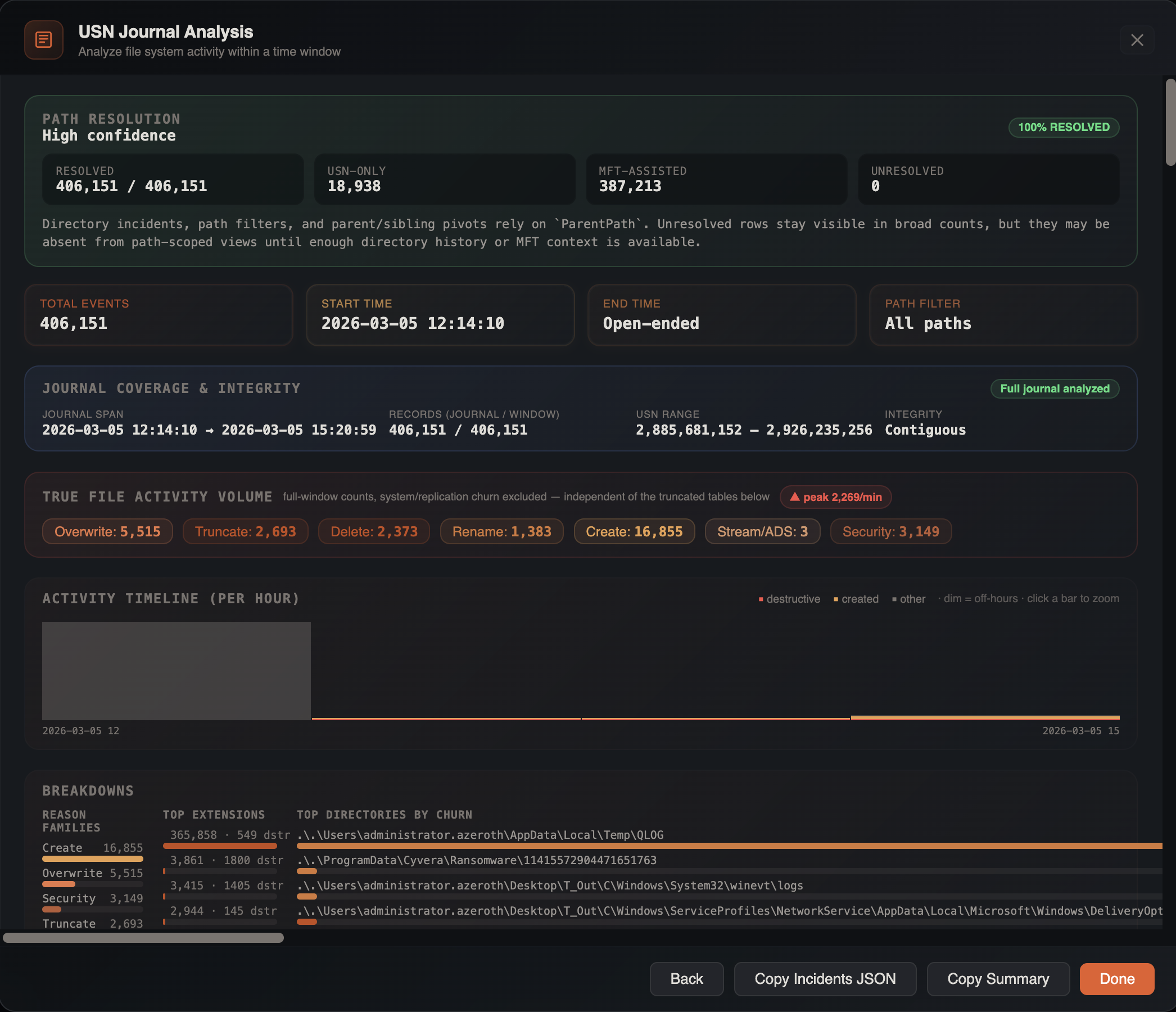
Each analysis category returns relevant entries with timestamps, full reconstructed paths, file references, reason flags, and source information. The tool also generates:
- Timeline — chronological view of all significant events
- File chains — sequences of operations on the same file (create → modify → rename → delete)
- Directory incidents — clusters of suspicious activity within the same directory
- Likely findings — auto-scored results ranked by forensic significance
- Narrative — human-readable summary of key findings
Resident Data Extraction
Extracts files that are stored directly within MFT records (resident $DATA attribute). Small files (typically under 700 bytes) are stored inline in the MFT rather than in separate disk clusters. This tool extracts those embedded files to an output folder.
This is a high-value capability for incident response: when a threat actor drops a small script, config file, or loader and later deletes it, the content often survives in the MFT long after the file is gone from disk. The MFT entry may be marked as free, but the resident data remains until the entry is reallocated and overwritten.
What It Recovers
- Deleted scripts and loaders — batch files, PowerShell scripts, VBScript, and small executables that the attacker cleaned up post-exploitation
- Configuration files — ransomware configs, C2 beacon configs, and tool configuration dropped during the attack
- Staging artifacts — small text files, credential dumps, and reconnaissance output the attacker used then deleted
- Legitimate small files — useful for baselining and identifying which resident files are anomalous
How to Use
- Import a raw
$MFTfile - Open Tools → Platforms → Windows → Master File Table → Extract Resident Data
- Select an output folder
- The tool scans MFT records and writes resident files to the output directory, preserving the original file paths as subdirectories
Combine with IOC Matching
After extracting resident data, run IOC matching against the MFT tab to identify known-bad filenames and paths among the recovered files.
See Also
- Process Inspector — trace execution chains for suspicious files found in MFT analysis
- IOC Matching — sweep extracted file names and paths against threat intel
- Bookmarks & Tags — timestomping and ADS detections auto-tag rows for filtering
- Search & Filtering — filter MFT data by extension, path, or timestamp range
- Histogram — visualize MFT activity distribution alongside the file activity heatmap