
Process Inspector
The Process Inspector builds parent-child process trees from Sysmon Event ID 1 and Windows Security Event ID 4688, then scores execution chains with chain rules, standalone detections, prevalence, binary trust, lifetime, injection, and privilege-use correlation. Results open as Story / Triage / Hunt / Graph / Raw views plus a Rules health report, with analyst suppressions, custom rules, and one-click pivots into the main grid and other IRFlow features.
Correctness and false-positive hardening in v1.0.13
Security PID roles are resolved per event, EvtxECmd hexadecimal PIDs no longer collapse to zero, and EID 7/11 enrichment scores the loaded module or created file rather than the process image. Administrative-tool, LSASS, network-volume, writable-path, installer, Python environment, and respawn findings now require the behavior they claim, while corroborated WinRM, DCOM, web-shell, RMM, tunnel, injection, and writable-path service activity remains detectable.
Opening the Process Inspector
- Menu: Tools → Platforms → Windows → Process Inspector
- Home: Process Inspector capability tile (when a tab is ready)
- Supports Sysmon EID 1 and Security EID 4688 from EVTX, EvtxECmd CSV, Hayabusa, Chainsaw process exports, and similar timeline imports
- Default event filter:
1,4688 - Configurable max processes (default 200,000)
Supported formats
| Format | How PI maps fields |
|---|---|
| Raw Sysmon / Security | Direct columns (Image, ProcessGuid, CommandLine, …) |
| Security 4688 | Reversed PID semantics (NewProcessId = child, ProcessId = parent); NewProcessName, TargetUserName, elevation / integrity labels |
| EvtxECmd (KAPE) | Real PID/GUID extracted from PayloadData1 / PayloadData5; image/cmdline from ExecutableInfo. Provider filter keeps Sysmon + Security only |
| Hayabusa | Compact KV in Details / ExtraFieldInfo |
| Chainsaw process | Nested Event.EventData.* aliases |
Auto-detected columns include PID/PPID, GUIDs, Image/ParentImage, CommandLine, User, UtcTime, EventID, Provider, Hostname, elevation/integrity, hashes, OriginalFileName, signer metadata, and ProcessAccess privilege fields when present.
How the tree is built
- GUID-preferred linking —
ProcessGuid↔ParentProcessGuid(survives PID reuse). Header shows GUID-linked when this is the primary mode. - Scoped PID fallback — when GUIDs are missing, re-link by host + LogonId/SessionId + PID with time ordering (parent must precede child). Link provenance is stored per node (
guid/pid-logon/pid-session/pid-host/unresolved/root). - Parent image backfill — 4688 rows without ParentImage inherit the linked parent’s path.
- Enrichment passes (best-effort, same table):
- Terminate — Sysmon EID 5 / Security 4689 → duration
- Process Access — Sysmon EID 10 → injection / hollowing indicators (
VM_WRITEnear create) - Privilege use — Security 4673 / 4674 → SeDebug, SeLoadDriver, multi-priv concentration
- Network — Sysmon EID 3 → outbound connection counts / destinations
- DNS — Sysmon EID 22 → query counts / sample names
- Image load — Sysmon EID 7 → unsigned / writable-path module counts
- File create — Sysmon EID 11 → PE/script drops in user-writable paths
Missing enrichment EIDs do not fail the build; the verdict hero reports telemetry completeness.
Detection engine
Chain rules (~330 parent→child pairs)
Indexed O(1) lookup from src/detection-rules.js, mapped to MITRE ATT&CK. Examples: Office → shell, web server → shell, LOLBins, WMI/PsExec lateral, browser → PowerShell.
Some interpreter chains are gated: benign svchost→powershell / cmd→powershell demote to context unless command-line corroboration exists. High-confidence chains (Office → shell, LSASS children) stay primary.
Standalone + context rules (PI rule catalog)
Implemented in src/utils/process-inspector.js (~60 pi-* rules, including path masquerade, binary trust, lifetime, and grandparent chains) across groups:
| Group | Examples |
|---|---|
| Execution | Encoded / stealth PowerShell, download cradles, AMSI/ETW patch keywords |
| Defense evasion | LOLBin download/decode, living-off-the-land staging |
| Credential access | LSASS tools, procdump, secretsdump patterns |
| Persistence | Scheduled task / service install patterns in cmdline |
| Lateral movement | WinRM, WMI remote, PsExec |
| RMM / exfil | AnyDesk, rclone, etc. (with sanctioned-path dampening) |
| Discovery | whoami, AD recon tools |
| Trust | Unsigned in trusted paths, OriginalFileName rename, cross-host hash mismatch |
| Lifetime | Short-lived respawns, missing terminate on offensive tools |
| Misc | Injection (EID 10), privilege concentration (4673/4674) |
Allowlist (PI_ALLOWLIST) dampens known-good EDR/AV/RMM/update agents under trusted roots (with cmdUntrust for abusive LOLBin shapes such as MpCmdRun -DownloadFile).
Prevalence boosts rare host/command patterns. Custom rules are analyst-supplied regexes (with ReDoS guards) defined inside Process Inspector — not in the Persistence Analyzer.
Grandparent multi-hop chains (pi-60)
Exact triples such as winword → cmd → powershell fire on the leaf even when intermediate hops were demoted by the chain FP gate. Walk uses consistentParentKey so PID-reuse edges do not invent false Office→shell paths.
Multi-stage sequences
Sliding ~10-minute windows promote multi-behavior attack stories, for example:
- Download → Execute
- Office/Script → LOLBin
- Recon → Lateral
- Credential Access → Lateral / LSASS dump → Lateral
- Multi-hop LOLBIN chain
- Office/Script → Download → RMM
- AMSI/ETW patch → Inject
- Disable Defender → Payload
- Download/Stage → Persistence
- Suspicious Exec → Network/DNS
- Drop File/Module → Execute
Sequences appear as SEQ badges and feed Story mode.
View modes
| Mode | What you see |
|---|---|
| Story | Investigation stories (host/user narrative, techniques, steps) |
| Triage | Suspicious chain clusters, risk-sorted |
| Hunt | Medium+ clusters |
| Graph | Spatial parent-child graph (multi-host swimlanes, pan/zoom). Seed severity filter; click node → detail panel |
| Raw | Full hierarchical tree / flat list with column filters |
| Rules | Rule health & coverage report (fired / silent / disabled built-in + custom + sequences) |
Toolbar: search, severity toggles, expand/depth (tree modes), copy/export, rare-process chips, Rules coverage toggle.
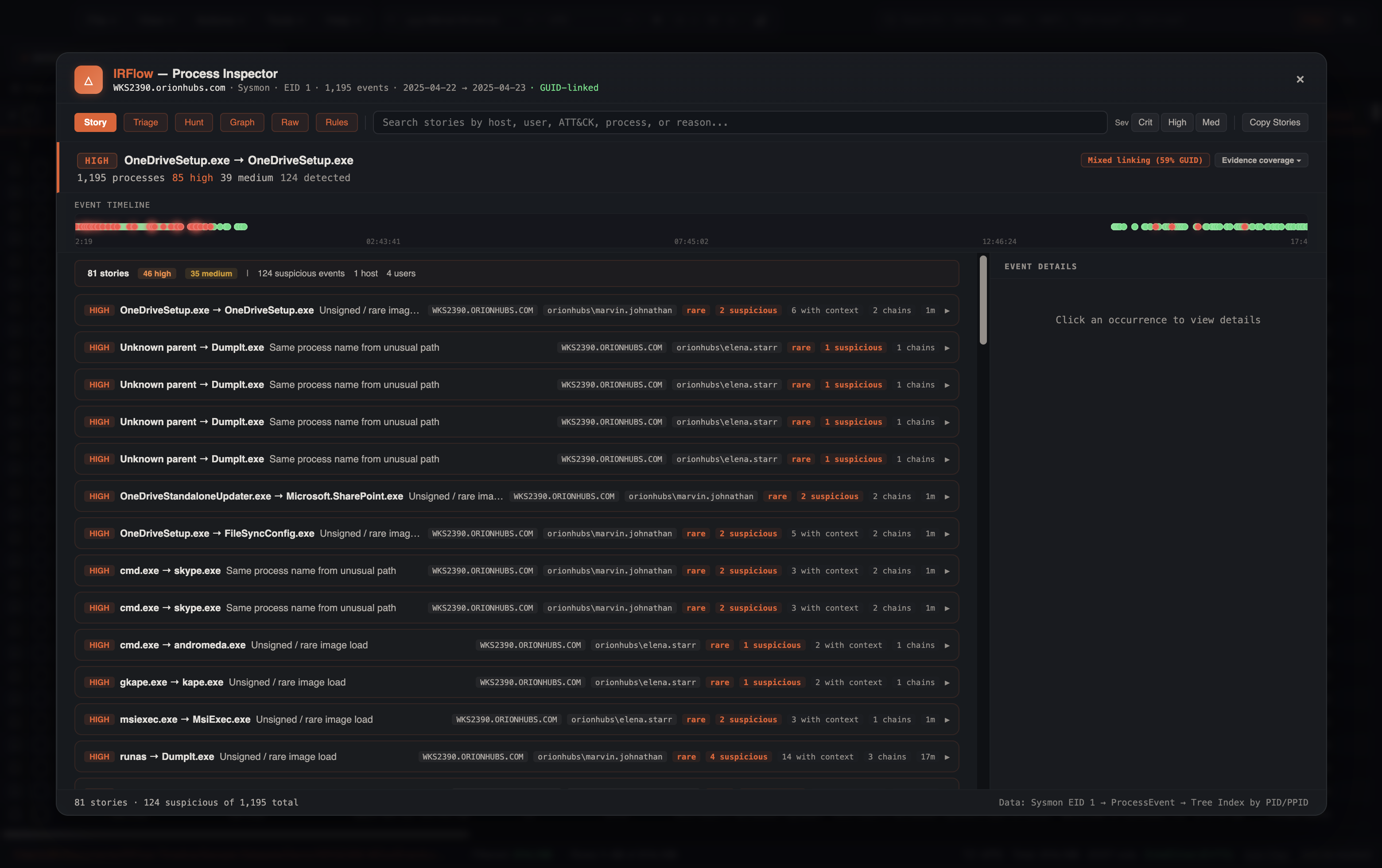
Story
Grouped investigation narratives — host, user, ATT&CK techniques, and the steps that make up each story. Open a row for Event Details and pivot into Graph or Raw.
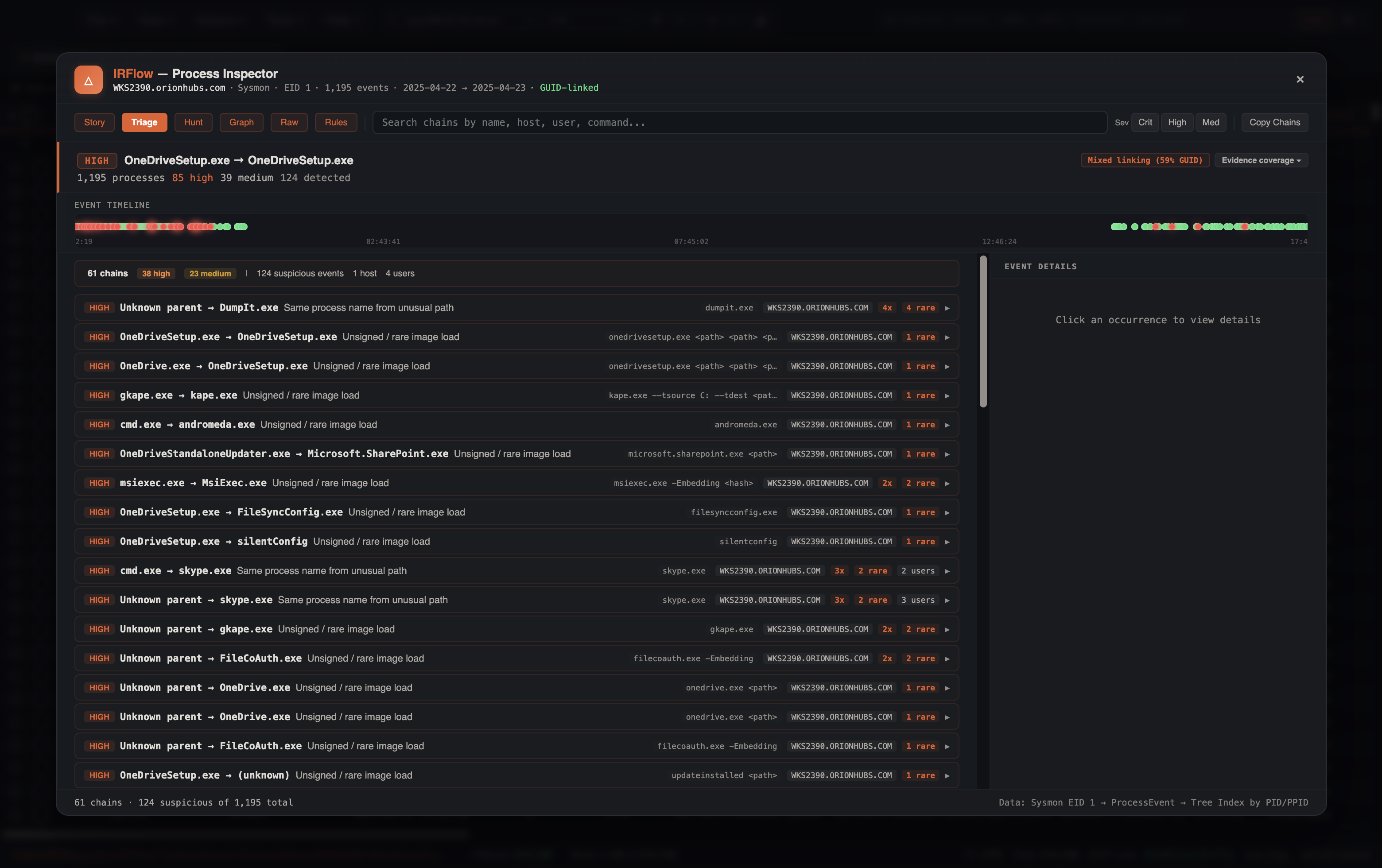
Triage
Suspicious chain clusters, risk-sorted. Use this after Story when you want every high/medium parent→child cluster without the narrative grouping.
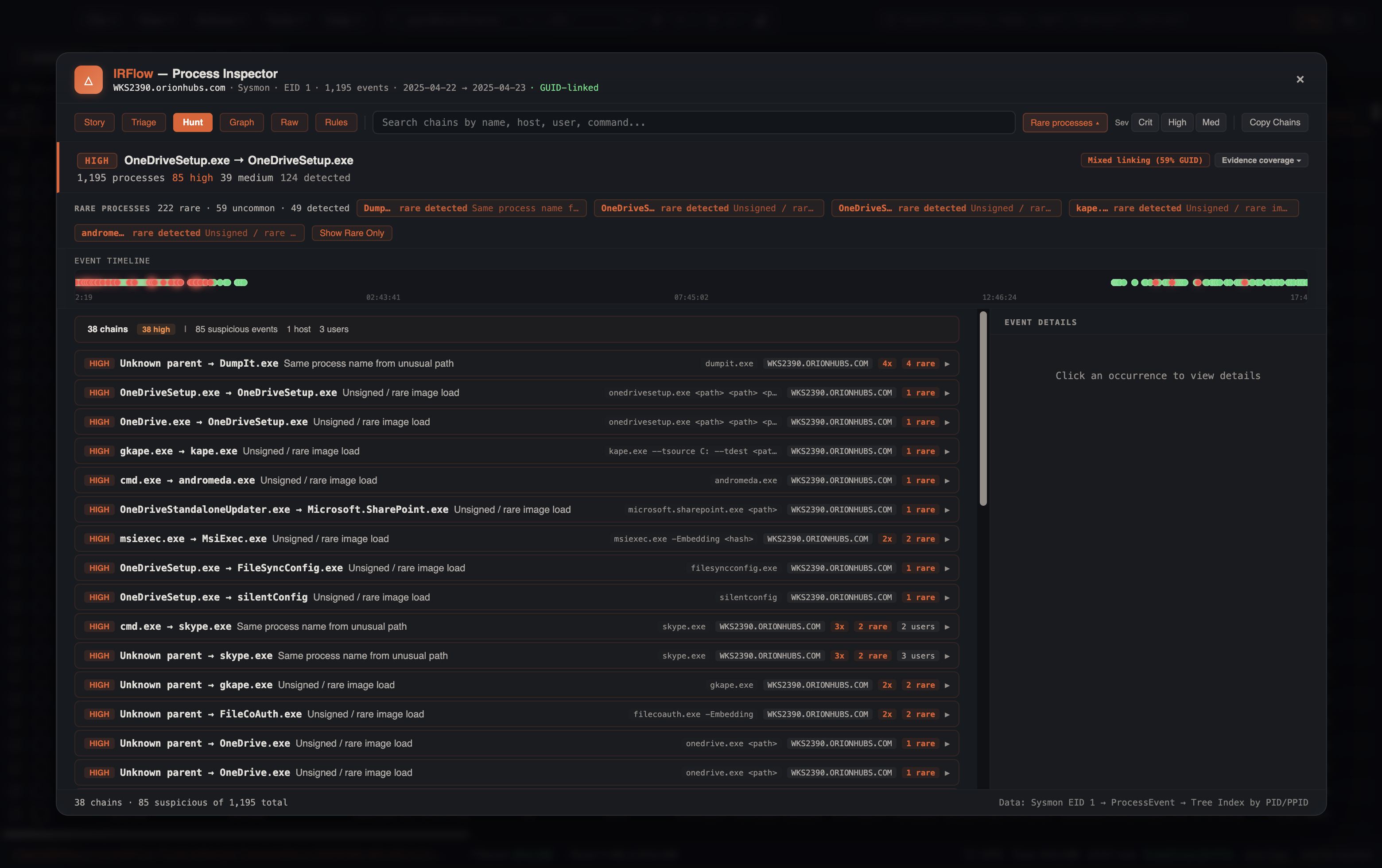
Hunt
Medium+ clusters plus Rare processes chips (prevalence leads). Toggle Show Rare Only to hide common noise.
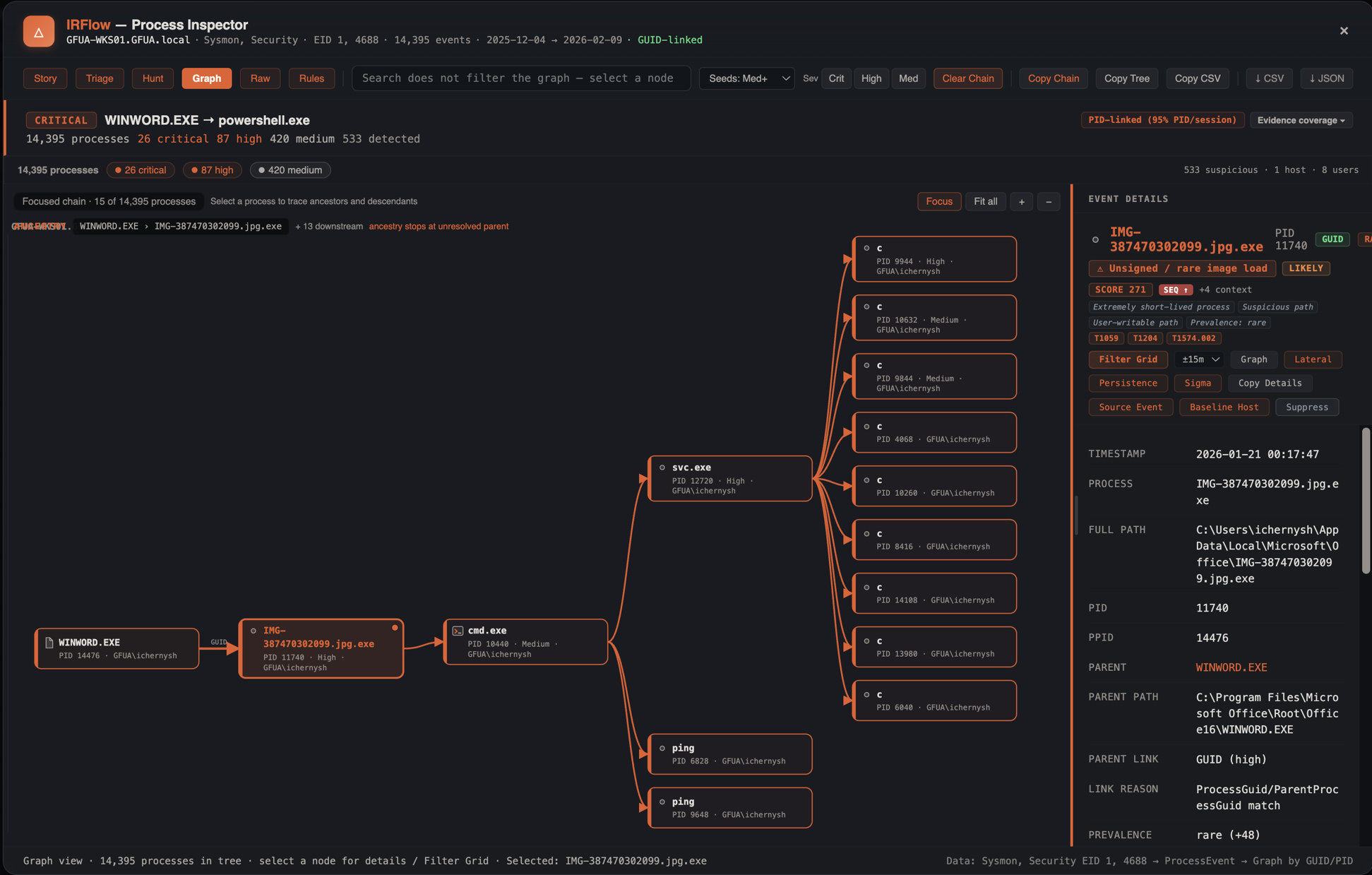
Graph
Spatial parent-child graph. Seed by severity (Med+ / High+ / Critical / All), pan/zoom, click a node for Event Details. Ancestry and descendants stay in view even when they fall below the seed filter.
Raw
Full hierarchical tree (or flat list) with column filters, expand/depth, Suspicious Only, and the Event Details pane. Filter Grid, Graph, Lateral, Persistence, and Sigma sit on the selected node.
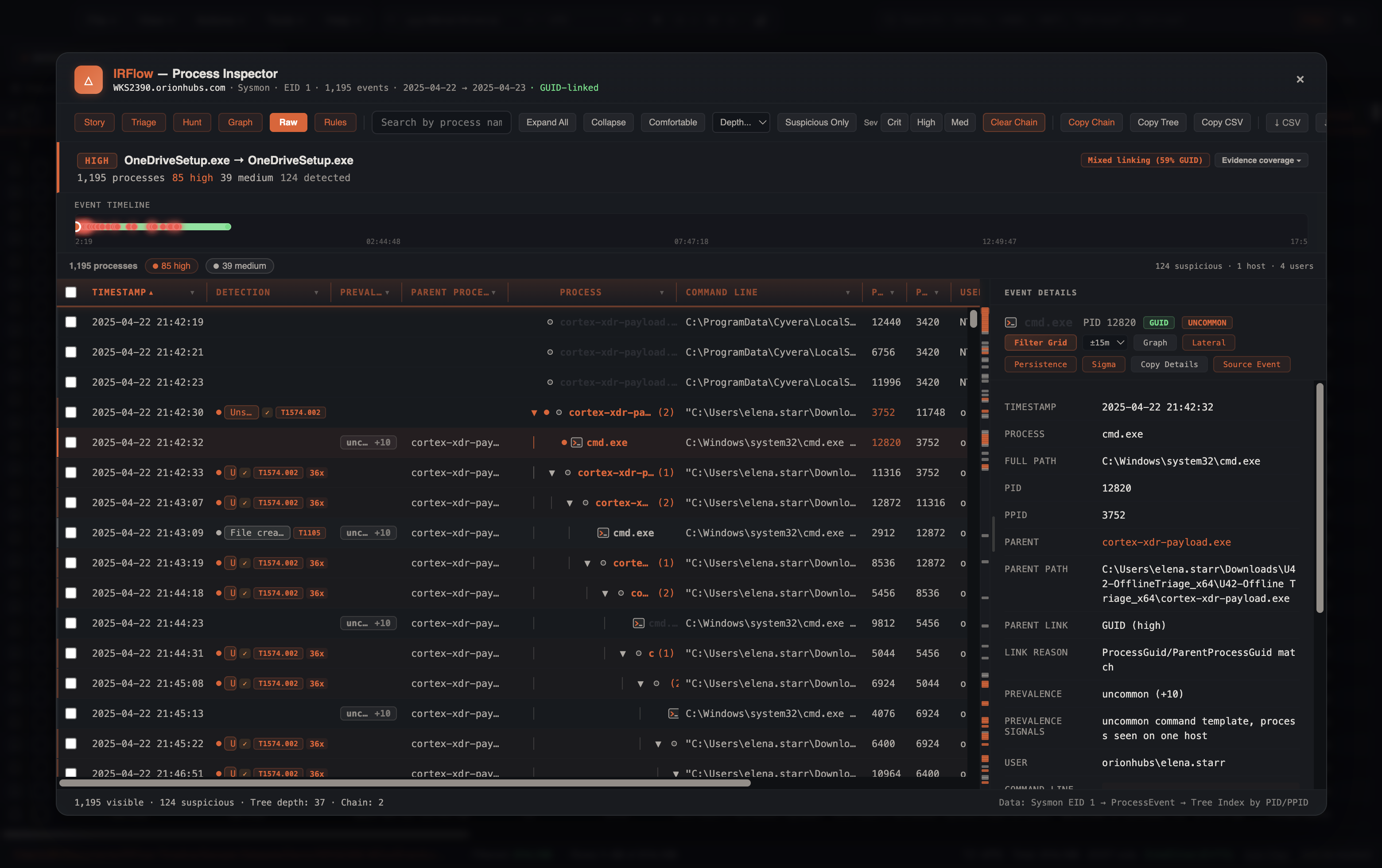
Rule health report
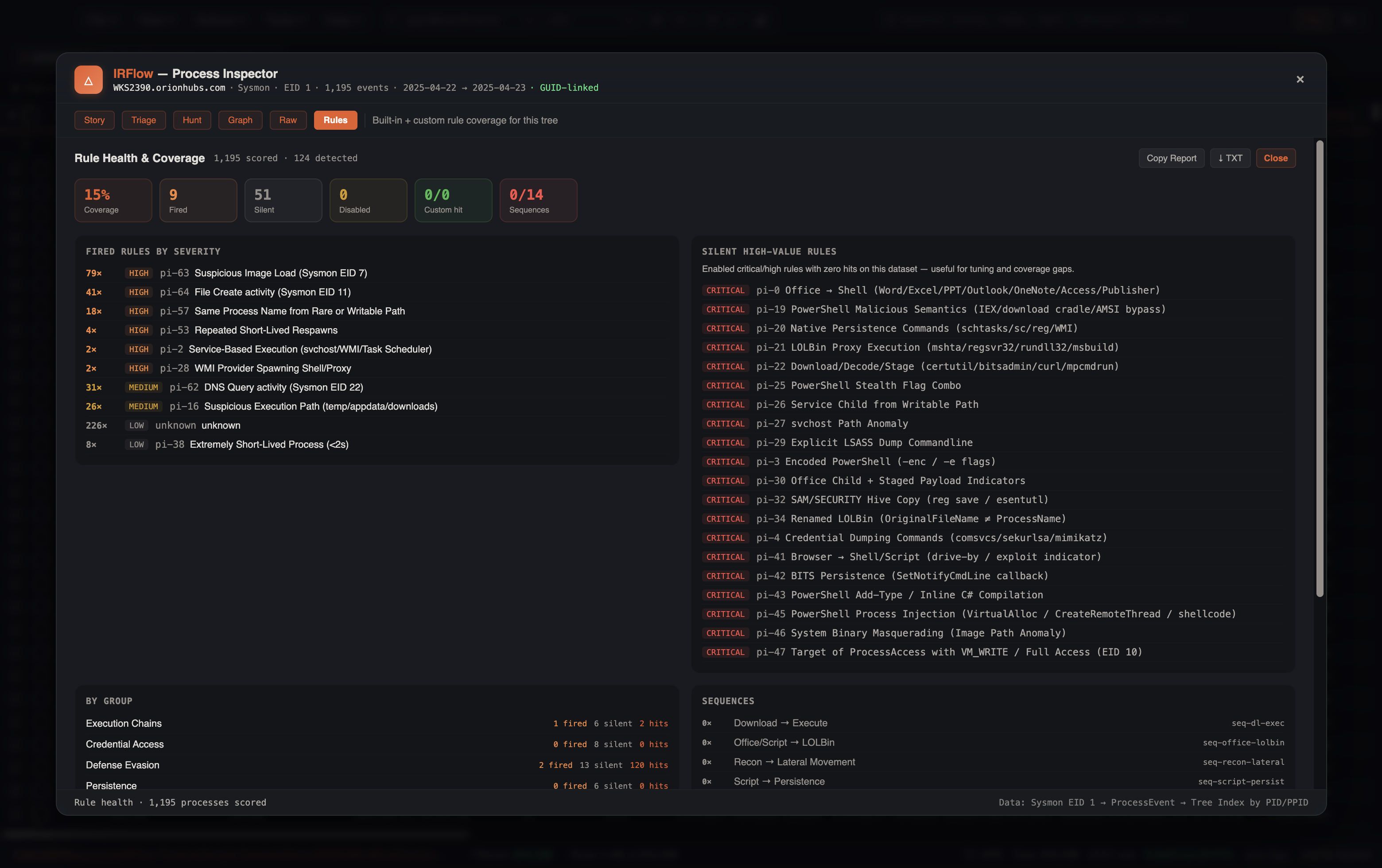
After a build, open Rules in the results toolbar for a coverage brief:
- Coverage % of enabled built-in rules that fired on this tree
- Fired / silent / disabled counts, custom-rule hits, sequence hits
- Top fired rules, silent high-value (critical/high with zero hits), by-group breakdown
- Techniques seen; copy or download a plain-text report (
process-rule-health.txt)
Use this to tune intents (Low-noise / Balanced / Broad), spot telemetry gaps (silent high-value rules on a clean-looking host), and document which detections applied to a case. Toggle Rules again to return to the previous view mode.
Config phase (before build)
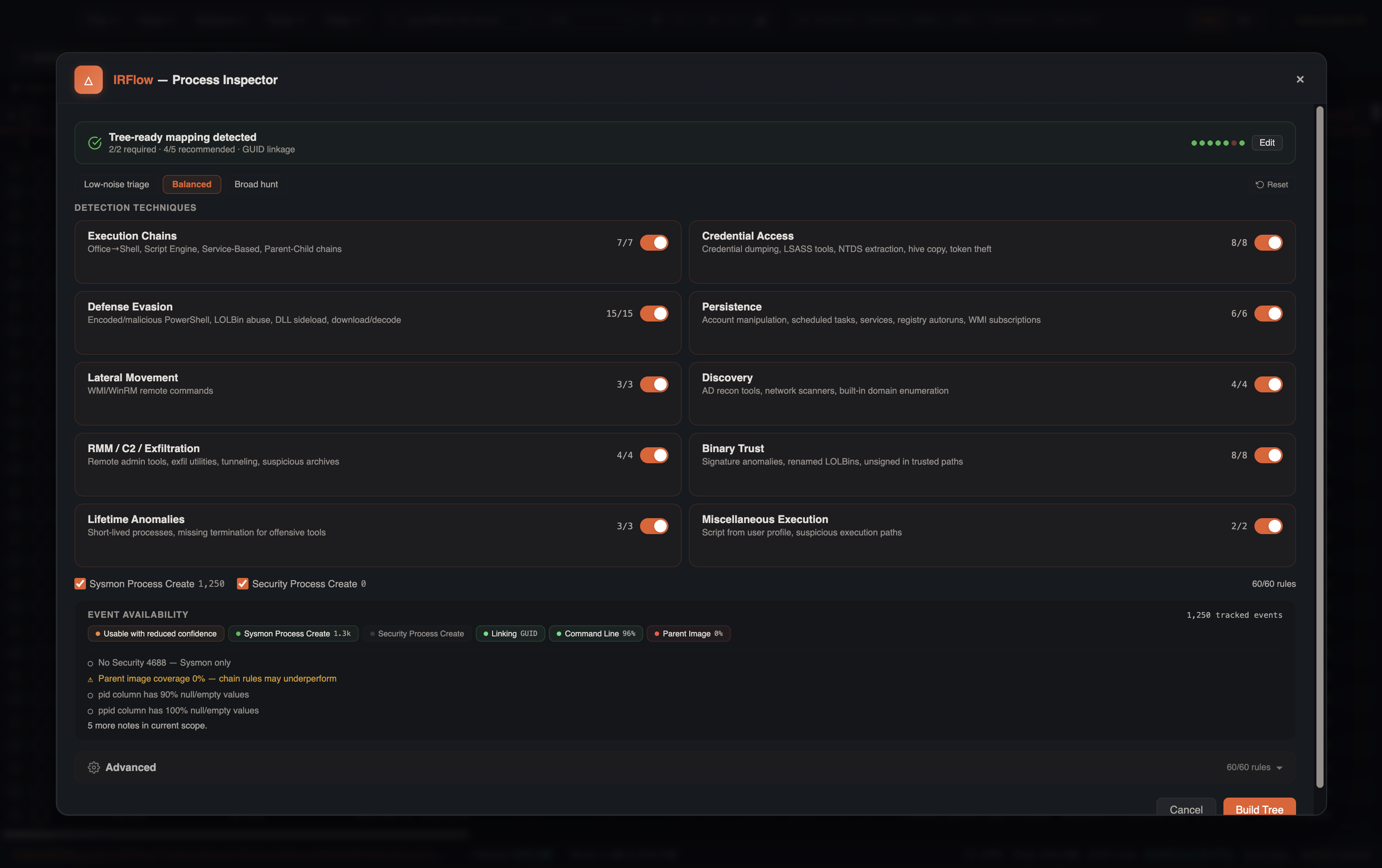
Before the tree runs, the config panel surfaces:
- Readiness score and detection capability chips (tree reconstruction, chain detections, standalone, sequences)
- Telemetry toggles — Sysmon EID 1 and Security 4688, with live event counts from preview
- Intent presets — Low-noise triage, Balanced, or Broad hunt (adjusts which
pi-*groups are disabled) - Technique groups — enable/disable rule groups with partial-state support
- Custom rules — parent/child name, path/cmdline contains, optional regex (ReDoS-guarded), severity, MITRE, behavior tag
- Column mapping disclosure when auto-map needs override
- Max process limit (default 200,000)
Verdict hero (results)
On build complete, a verdict-first banner shows:
- Worst severity + headline (top story or detection summary)
- Counts (critical / high / medium / total processes)
- Top stories (jump to Story view)
- ATT&CK technique chips
- Link quality (GUID vs PID)
- Telemetry completeness (Process Create · Terminate · Process Access · Privilege Use)
- Truncation warning when the max process limit was hit
- Scoped rebuild — host and/or time window when the global max truncated the tree
Detail panel
The Event Details pane is shared across Story, Triage, Hunt, Graph, and Raw. Graph and Raw screenshots above show it populated.
Select a process for:
- Detection reason, confidence, triage score, evidence pills, MITRE badges
- Fields: path, parent, link provenance, prevalence, integrity, cmdline (token highlight + base64 decode)
- Source event, Related EVTX timeline, cross-telemetry pivots
- Filter Grid — ProcessGuid (or host+PID) ± time window, including child creates; optional scroll to create event
- Graph — focus this process in Graph mode
- Open Lateral / Persistence / Sigma — time+host context handoffs
- VirusTotal — in-app lookup when a VT API key is configured; otherwise opens the public VT page
- Baseline / Suppress (Analyst Profile)
Grid pivot (Filter Grid)
One click from a process:
- Prefer ProcessGuid contains (and ParentProcessGuid for children)
- Else PID (decimal + hex) + PPID, scoped by hostname when available
- Always apply ±N minutes on the timestamp column when parseable (5m / 15m / 1h / 6h)
- Clears competing search/column filters so the pivot is deterministic
- Sets the proximity pill and, when possible, scrolls to the create event
Works with EvtxECmd/Hayabusa blob columns via contains on the payload field.
Cross-feature handoffs
From the detail panel (time window default ±30m, host-scoped when possible):
| Action | Behavior |
|---|---|
| Open Lateral Movement | Applies host + time filters on the tab, opens LM, auto-runs analysis |
| Search Persistence | Same context window, opens Persistence Analyzer, auto-runs |
| Sigma around selection | Same context window, opens Sigma wizard on current tab (tune profile and run) |
Analyst Profile
Suppressions and baselines (process, parent, host, user, image, cmdline contains, reason). Save/Load JSON profiles. See Analyst Profiles.
Custom detection rules live in the Process Inspector config panel under Custom Rules. Each rule can match any combination of:
- Parent process name
- Process name
- Image path contains
- Command line contains
- Optional regex (process / cmdline / path)
- Severity, MITRE technique, and behavior tag (so the rule participates in sequence detection)
Exports
- CSV / JSON of visible processes (with link provenance and detection fields)
- Copy chain / tree / selected rows / stories
- Linked evidence export from Related EVTX pivots
Scale & rebuild
- Tree build runs in an analyzer worker (job-backed).
- Detection scoring runs chunked asynchronously after the tree returns (progress bar in the hero on large sets) so the UI stays responsive.
- When the process limit truncates results, the hero offers a scoped rebuild: pick host and/or time window and re-run without raising the global max.
Limitations
- Windows process-create focused (Sysmon 1 / Security 4688). Linux/macOS process telemetry is not modeled.
- Graph and detection score cap large trees (default 200k processes; graph seeds ~220 nodes). Truncation is warned in the hero and header.
- EID 10 / 5 / 3 / 22 / 7 / 11 / 4673 enrichment requires those events in the same imported table.
- PID-only linking remains best-effort under logon/session scope; prefer Sysmon GUIDs.
- Sigma handoff opens the wizard with tab + filters prepared; it does not auto-start a Hayabusa scan.
Tips
Sysmon configuration
Log Process Create (1) with command lines, hashes, and (where licensed) Process Access (10). Include terminate (5) for lifetime rules.
Large fleets
Use Story/Triage first, then Graph for spatial chains. When truncated, raise max processes or filter the tab by host/time before opening PI.
Pivot, don’t re-hunt
Filter Grid + Related EVTX is usually faster than re-importing for process-scoped review.