
Supported Formats
IRFlow Timeline supports the most common forensic timeline and log formats used in DFIR investigations.
CSV / TSV / TXT / LOG
Extensions: .csv, .tsv, .txt, .log
The most versatile import format. IRFlow Timeline auto-detects the delimiter by analyzing the first lines of the file.
| Delimiter | Detection Priority |
|---|---|
Tab (\t) | Highest — checked first |
Pipe (|) | Second |
Comma (,) | Default fallback |
Features
- Streaming import — 128MB chunks, never loads the full file into memory
- RFC 4180 compliant — proper quote handling for embedded delimiters
- Fast-path parsing — tab and pipe delimited files skip quote analysis for speed
- Header deduplication — duplicate column names are auto-renamed with numeric suffixes
- Adaptive batch insertion — batch size auto-tunes based on column count (up to 100,000 rows per batch) for optimal write throughput
- Time-based progress — progress updates every 200ms to reduce IPC overhead on large files
Common DFIR CSV Sources
- KAPE / EZ Tools output (MFTECmd, PECmd, LECmd, etc.)
- Hayabusa and Chainsaw detection results
- BrowsingHistoryView exports
- Plaso
psortCSV output - Custom log parsers and scripts
Excel (XLSX / XLS / XLSM)
Extensions: .xlsx, .xls, .xlsm
Excel files are supported with format-specific parsers for modern and legacy formats.
Features
- Sheet selection — for multi-sheet workbooks, a dialog lets you choose which sheet to import
- XLSX streaming reader — uses ExcelJS WorkbookReader for memory-efficient import of modern
.xlsxfiles - Legacy .xls support — binary OLE2/BIFF format files (
.xls) parsed via SheetJS, loaded in-memory (fine for .xls's 65K row limit) - Excel serial date handling — numeric serial dates (e.g.,
45566→2024-10-05) are automatically recognized in histogram and timeline functions - Cell type handling:
- Dates are converted to ISO format
- Formulas resolve to their computed values
- Objects are converted to text representation
- Empty cell padding — sparse rows are padded to match the header column count
- Adaptive batch sizing — batch size auto-tunes based on column count for optimal throughput
Common DFIR Excel Sources
- KAPE / EZ Tools XLSX output
- Analyst spreadsheets and triage worksheets
- Threat intelligence feeds
EVTX (Windows Event Logs)
Extensions: .evtx
Native binary parsing of Windows Event Log files using the @ts-evtx library. No need to pre-convert with external tools.
Features
- Binary parsing — reads EVTX format directly, no conversion step
- Bounded native reads — validates the 4 KiB file header, then parses one 64 KiB EVTX chunk at a time instead of loading the complete log into memory
- Large-log support — handles up to 65,535 declared chunks (approximately 4 GiB), including multi-gigabyte Security logs that exceed Node's 2 GiB whole-file Buffer ceiling
- Dynamic schema discovery — samples the first 500 events to discover all available fields
- Fixed fields extracted from every event:
| Field | Description |
|---|---|
datetime | Event timestamp |
RecordId | Sequential event record number |
EventID | Windows event identifier |
Provider | Event source provider name |
Level | Event severity level |
Channel | Log channel (Security, System, etc.) |
Computer | Source computer name |
Message | Event message text |
- Discovered fields — provider-specific payload fields are extracted automatically based on the events found during schema discovery
- Adaptive batch insertion — batch size auto-tunes based on column count for optimal throughput
Supported Event Types
EVTX parsing works with all Windows event logs including:
- Security — Logon events (4624, 4625, 4648), privilege use, audit changes
- Sysmon — Process creation (Event ID 1), network connections, file operations
- System — Service changes, driver loads, shutdown/startup
- Application — Application errors, warnings
- PowerShell — Script block logging, module logging
Plaso (Forensic Timeline Database)
Extensions: .plaso, .timeline
Plaso is the forensic timeline format created by the log2timeline / plaso framework. IRFlow Timeline reads Plaso SQLite databases natively. Files with the .timeline extension are auto-detected — if they are valid Plaso databases, they are parsed as Plaso; otherwise they fall through to CSV parsing.
Features
- Native SQLite reading — uses
better-sqlite3to query the Plaso database directly - Schema validation — verifies the
metadatatable andformat_versionfield - Row count estimation — reads total count from metadata for progress reporting
- Full data extraction — imports all rows with all available columns
Plaso Workflow
- Run
log2timelineto create a.plasofile from your evidence - Open the
.plasofile directly in IRFlow Timeline — no need to runpsortfirst - All timeline entries are imported with their original columns
Performance
For very large Plaso databases (10GB+), consider using psort to export a filtered CSV first, as the Plaso reader loads all rows in a single query.
Raw $MFT (NTFS Master File Table)
Extensions: .mft, or any file with MFT in the name, or $MFT (no extension)
Native binary parsing of raw NTFS Master File Table files. No need to pre-process with MFTECmd — open the raw $MFT directly.
Features
- Binary parsing — reads raw MFT records (1024 bytes each) directly from the file
- Magic byte detection — auto-detects raw
$MFTfiles by theFILE0signature, even without a file extension - Full attribute extraction — parses
$STANDARD_INFORMATION(0x10),$FILE_NAME(0x30),$OBJECT_ID, and$DATAattributes - Timestomping detection — compares SI and FN timestamps, flags files where
SI < FN - Zone.Identifier extraction — parses resident ADS content to extract download origin data
- Parent path resolution — two-pass architecture: first pass builds the directory tree, second pass resolves full parent paths
- Resident data extraction — can extract small files stored directly inside MFT records (via Tools → Platforms → Windows → Master File Table → Extract Resident Data)
Extracted Columns
| Column | Description |
|---|---|
EntryNumber | MFT record number |
FileName / Extension | File name and extension |
ParentPath | Full resolved directory path |
FileSize | Logical file size |
IsDirectory / InUse | Directory flag and allocation status |
Created0x10 / LastModified0x10 / LastRecordChange0x10 / LastAccess0x10 | $STANDARD_INFORMATION timestamps |
Created0x30 / LastModified0x30 / LastRecordChange0x30 / LastAccess0x30 | $FILE_NAME timestamps |
SI<FN | Timestomping indicator (SI timestamp earlier than FN) |
HasAds / IsAds | Alternate Data Stream flags |
ZoneIdContents | Zone.Identifier ADS content (download origin) |
SiFlags / NameType | Attribute flags and filename namespace |
NTFS Artifact Analysis Tools
When a raw $MFT is loaded, additional analysis tools become available under Tools → Platforms → Windows → Master File Table:
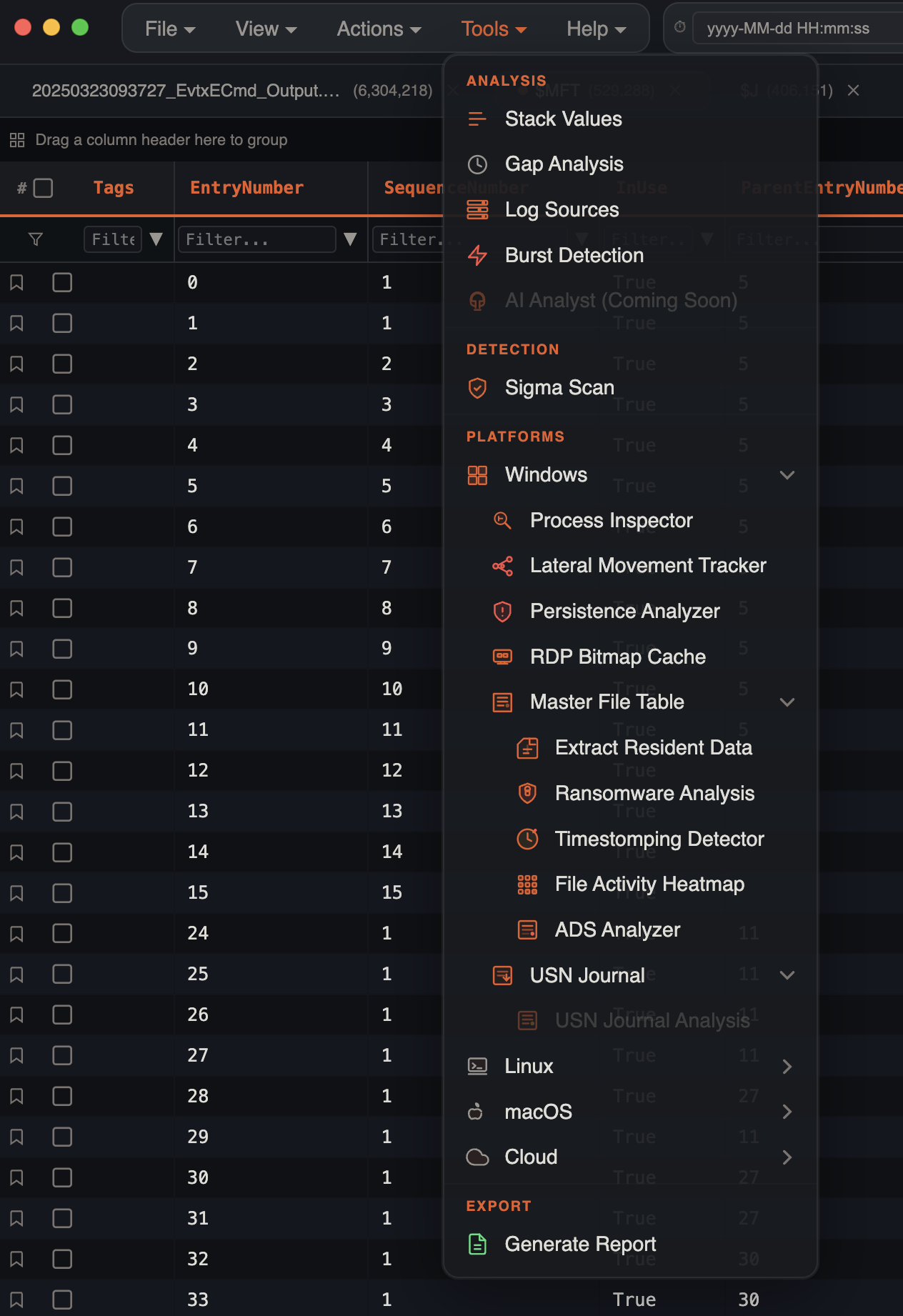
- Extract Resident Data — extract files stored inside MFT records
- Ransomware Analysis — detect encryption patterns by extension
- Timestomping Detector — find files with manipulated timestamps
- File Activity Heatmap — visualize file creation/modification patterns
- ADS Analyzer — analyze Alternate Data Streams and download origins
Raw $J (USN Journal)
Extensions: Files named $UsnJrnl:$J, $UsnJrnl%3A$J, $J, or files under a $Extend directory
Native binary parsing of raw NTFS USN Journal ($UsnJrnl:$J) files. Provides a granular record of every file system change.
Features
- Binary parsing — reads USN_RECORD_V2 variable-length records directly
- Filename detection — auto-detects USN Journal files by common naming patterns (
$UsnJrnl,$J,$Extend) - Null padding skip — handles the large null-padded regions typical in raw
$Jextractions - Parent path resolution — if an MFT is available, resolves parent entry numbers to full paths
- Reason flag decoding — translates USN reason bitmasks to human-readable strings (e.g.,
FileCreate|Close)
Extracted Columns
| Column | Description |
|---|---|
Name / Extension | File name and extension |
EntryNumber / SequenceNumber | MFT entry and sequence numbers |
ParentEntryNumber / ParentSequenceNumber | Parent directory MFT reference |
ParentPath | Resolved parent path (when available) |
UpdateTimestamp | Timestamp of the change |
UpdateSequenceNumber | USN record sequence number |
UpdateReasons | Decoded reason flags (e.g., DataOverwrite|Close) |
FileAttributes | Decoded file attributes |
RDP Bitmap Cache Artifacts
Filenames: bcache*.bmc, cache????.bin
RDP Bitmap Cache files are handled through Tools → Platforms → Windows → RDP Bitmap Cache rather than the normal timeline importer. The analyzer recovers bitmap tiles and collages with bmc-tools, records source/output hashes, keeps previous extraction history, and can export an evidence package for reporting.
Use this workflow for Windows profile artifacts under paths such as:
Users\<user>\AppData\Local\Microsoft\Terminal Server Client\CacheKAPE VHDX Images (Triage Collections)
Extension: .vhdx (KAPE --vhdx output, or any VHDX holding an NTFS volume)
A VHDX is a disk image, not a table, so it opens through File → Open Triage Collection… rather than File → Open. Pick the .vhdx in the same dialog you would use for a KAPE folder. macOS cannot mount a VHDX, so IRFlow reads the container and the NTFS volume inside it directly:
- The VHDX header, region table and block allocation table are parsed (dynamic and fixed images; an unflushed VHDX log is replayed in memory so the image on disk is never modified).
- The NTFS volume is located behind the MBR or GPT (or at offset 0 for a bare volume) and its
$MFTis walked to enumerate every live file with its full path. - Only the artifacts the triage pipeline recognizes are copied into a scratch folder that mirrors the collection's layout — event logs,
$MFT/$J/$LogFile, registry and user hives, Amcache, Prefetch, LNK, Jump Lists, scheduled tasks, SRUM, browser and Defender data, RDP cache, KAPE's own logs, and EZ-Tools CSVs. Unrelated files stay in the image and are counted. - The scratch folder becomes the triage root: the manifest, host attribution, the Lateral Movement and Sigma lanes, and
$MFT/$Jimport all work exactly as for a folder.
Extracted files are scratch data (removed when the app quits) and land on the Temp Storage volume, so point File → Set Temp Storage Folder… at a drive with room for the collection.
Not supported
- Differencing (child) VHDX images — merge or export a full disk first.
- VHD (v1) images — export as VHDX, or open the collection folder instead.
- NTFS-compressed or EFS-encrypted files inside the image are reported by path and skipped rather than written as garbage.
- Deleted files are not carved from the image; import the collected
$MFTfor deleted-file analysis.
AI App Artifacts
Inputs: app-data folders, KAPE / triage collection roots, .jsonl, .json, .db, .sqlite, .sqlite3, .ldb, and .log files from supported AI apps.
AI app evidence is handled through Tools → Analysis → AI Artifacts → Collect AI Artifacts or by opening a supported app-data folder directly (AI Apps submenu for single-tool imports). IRFlow Timeline parses local AI history into a normal timeline tab so prompts, responses, tool calls, session IDs, workspace paths, source evidence, and possible secret exposure can be searched, tagged, and exported.
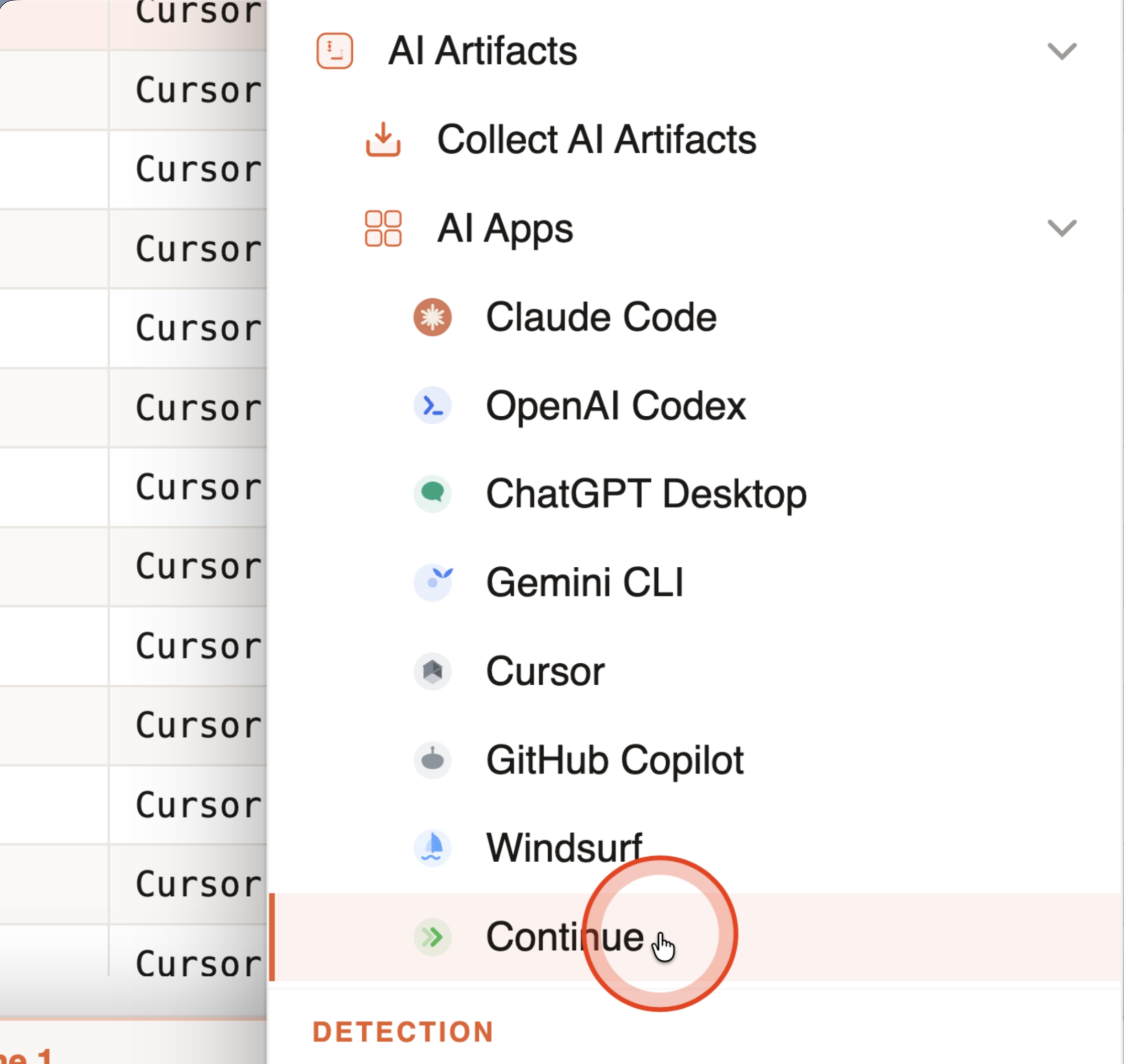
Supported AI app families include:
| App | Common artifacts |
|---|---|
| Claude Code / Desktop | ~/.claude/history.jsonl, project JSONL, CLI settings/hooks/permissions/MCP, credential-safe instruction/memory/skill/plugin/task/plan/file-history/backup inventory, relocated CLAUDE_CONFIG_DIR, and ~/.claude.json; Desktop/Cowork sessions, audit rows, deletion tombstones, staged uploads, usage history, worktrees, bridge state, and desktop configuration |
| OpenAI Codex | $CODEX_HOME or ~/.codex/, streamed rollout JSONL including independent media references, history.jsonl, config.toml project trust/MCP/plugin settings, instructions and hashed skill/plugin inventory; complete state*, thread_history*, auxiliary SQLite companion inventory; rules, shell snapshots, memories, hooks, remote-control/SSH state, automations, goals/queue, ambient suggestions, and voice history |
| Grok Build | $GROK_HOME or ~/.grok/, prompt/session streams, permission audit and upload counters; independent terminal logs; config/trust/version/agent identity and hashed prompt context; worktrees.db; background-task/upload/automation inventory; session search, unified log, and active sessions |
| Grok Bot | macOS-qualified ~/.grokbot/ local exec daemon (settings, current/rotated daemon logs, attachment staging) and Application Support/Grok Bot/: bounded sand-client-persistence transcript replicas (prompts, replies, typed request/decision states, tool calls/notices, v1/v2 send journal, attachment references), sentry/scope_v3.json + session.json (account/app/OS/runtime context), Local State (Chromium profile creation), and cached link-preview metadata. Daemon lifecycle rows without IDs do not establish which command ran or whether it succeeded; Windows/Linux remain unqualified. |
| ChatGPT Desktop | Local LevelDB / SQLite stores plus inventory of conversations-v2-* and conversations-v3-*/*.data bundles, app_pairing_extensions/ (Work-with-Apps pairings with write capability). The merged ChatGPT/Codex app (2026-07-09) writes a Chromium profile at ~/Library/Application Support/Codex (History, sentry/ identity + breadcrumb trail, credential-store inventory for Default/ and the agent's codex-browser-app/); conversation bodies still live in ~/.codex |
| Gemini CLI | GEMINI_CLI_HOME or ~/.gemini: current and immutable rewind/revision JSONL history, shell history, legacy sessions/checkpoints/logs, project/trust/account state, settings and MCP/tool policy, hashed GEMINI.md/skill inventory, and settings/project backups |
| Cursor | Agent JSONL/TXT transcripts; all eligible composer store.db and state.vscdb files (default maximum 2,048), including tool-only call/result evidence; conversation-search.db; hooks/MCP/plans/agent/skill/plugin context; raw ai-tracking index provenance |
| GitHub Copilot | $COPILOT_HOME / ~/.copilot CLI sessions, commands, plans/checkpoints, safe session-store metadata, plus VS Code-family workspaceStorage/*/chatSessions/ and emptyWindowChatSessions/ |
| Windsurf | Windsurf/User/globalStorage/state.vscdb, workspaceStorage/*/state.vscdb |
| Continue | ~/.continue/sessions/*.json |
Use this workflow when AI-assisted activity may be relevant evidence: pasted secrets, suspicious prompts, generated commands, workspace-specific development activity, or AI tool output tied to an incident.
The consumer Grok product, Gemini desktop/web/mobile, Claude consumer chat, and Cursor cloud-only history remain explicitly unsupported until a real native store or vendor-export corpus is qualified. Browser origin hints do not establish recoverable conversation content.
AI source discovery is deterministic and bounded. When an explicit file or database limit is reached, the import metadata retains the inventory fingerprint, resume cursor, omission count, and remaining source paths. Every processed source receives a completion status such as parsed, empty, partial, malformed, unsupported, excluded, or unavailable; a successful tab does not imply that every source was readable.
SQLite databases are parsed from a transactionally consistent snapshot that includes committed WAL content. The snapshot is integrity-checked, while the acquired database and companion hashes remain separate from the temporary parse-copy hash. Runtime metadata also records wall time, first-result latency, rows per second, observed bytes read, eligible source bytes, and peak RSS. Full source files remain the evidence; row bodies and display fields can still be bounded with an explicit omission or truncation marker.
ChatGPT Computer History (Skysight)
Inputs: a segments/ directory of <YYYY-MM-DDTHH-MM-SSZ>/events.jsonl + metadata.json buckets, and/or a skysight/resources/ directory of *-(10min|6h)-*.md activity summaries. A .codex folder, a CUAService group container, or a triage root containing either will also resolve.
Imported through Tools → Analysis → AI Artifacts → AI Apps → OpenAI Codex → ChatGPT Computer History. This is not AI conversation history — it is macOS user-activity telemetry (app focus, clicks, keystrokes, shortcuts, selections, drags, terminal buffer changes, window and URL context), so it opens in its own tab with a dedicated 54-column schema rather than the AI Query History columns.
| Path | Retention |
|---|---|
~/Library/Group Containers/2DC432GLL2.com.openai.sky.CUAService/Library/Caches/ComputerUse/Skysight/segments/ | ~48 hours, then purged |
~/.codex/memories/extensions/skysight/resources/ | Until the user clears them (recoverable from the memories git history afterwards) |
macOS only, opt-in, off by default, and unavailable in the EEA, Switzerland, and the UK — so absence of the artifact says nothing about user activity. Collect the raw segments early; on a stale image the derived summaries may be all that survives, and they are model-generated interpretation rather than primary evidence.
Full artifact inventory, caveats, and investigation workflow: ChatGPT Computer History.
Format Detection
IRFlow Timeline determines the file format by extension and content detection:
.csv, .tsv, .txt, .log     →  CSV/TSV Parser (auto-detect delimiter)
.xlsx, .xlsm                →  Excel Streaming Parser (ExcelJS)
.xls                        →  Legacy Excel Parser (SheetJS)
.evtx                       →  EVTX Binary Parser
.plaso, .timeline            →  Plaso SQLite Reader (auto-detect; .timeline falls back to CSV)
.mft / $MFT (FILE0 magic)  →  Raw MFT Binary Parser
$J / $UsnJrnl (by name)    →  Raw USN Journal Parser
.vhdx                        →  File → Open Triage Collection… (VHDX container + NTFS reader)
AI app folders / stores      →  AI Query History parser
Skysight segments / summaries →  Computer History parser (own tab, 54-column schema)
Files without a recognized extension are auto-detected by name patterns and magic bytes, so raw $MFT and $J files extracted by forensic tools work without renaming.
All formats feed into the same SQLite-backed data engine, so once imported, all features (search, filter, histogram, process tree, etc.) work identically regardless of the source format.