
Multi-Tab Analysis
IRFlow Timeline supports opening multiple files simultaneously in separate tabs, enabling cross-source correlation and parallel investigation.
Opening Multiple Files
Each file you open creates a new tab:
- Cmd+O to open additional files
- Drag and drop multiple files onto the window
- Each tab operates independently with its own filters, bookmarks, and tags
Tab Management
Navigation
- Click a tab to switch to it
- Tabs show the filename and row count
- The active tab is highlighted
Closing Tabs
- Click the close button on a tab
- Cmd+W closes the active tab
- Bookmarks and tags for closed tabs are lost unless saved in a session
Reordering
Drag tabs to reorder them. This is useful for organizing related files next to each other.
Independent State
Each tab maintains its own:
- Filter configuration
- Search term and mode
- Bookmarks
- Tags
- Color rules
- Column layout (pinned, hidden, widths)
- Sort order
- Histogram cache
Cross-Tab Search
Use Cmd+Shift+F to search across all open tabs simultaneously:
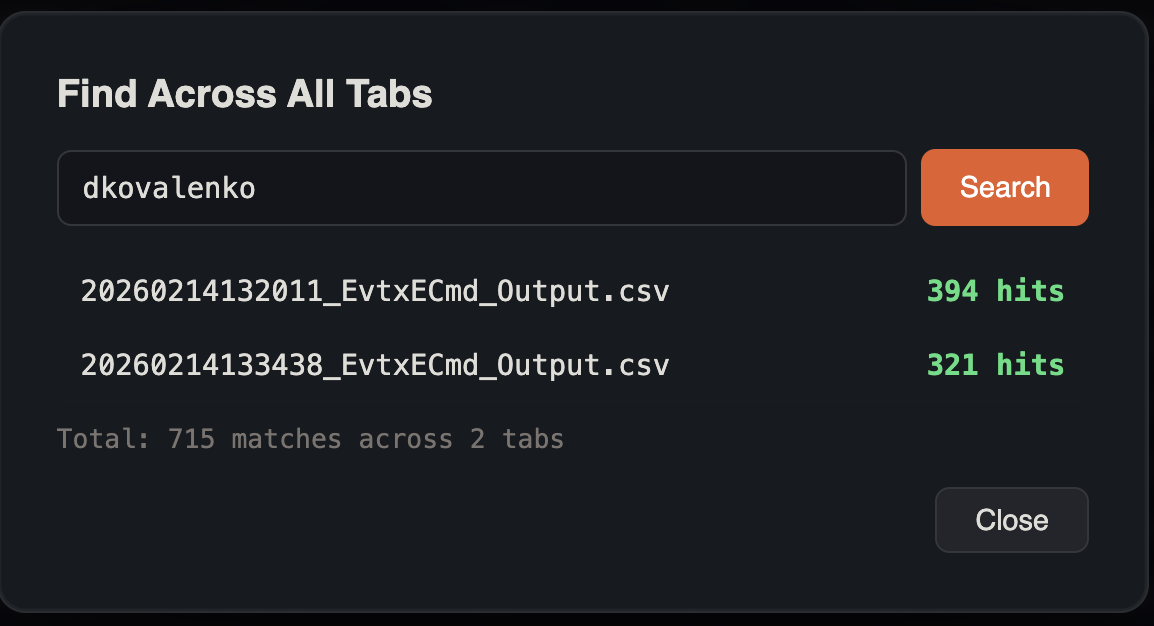
- Enter your search term
- Results show the match count per tab
- Click a result to jump to that tab with the search applied
This is useful for answering questions like:
- "Does this IP appear in any other log source?"
- "Which timelines contain references to this executable?"
Multi-Tab Investigation Workflow
A common workflow for multi-source investigations:
- Open all sources — Security EVTX, Sysmon EVTX, MFTECmd CSV, etc.
- Cross-tab search — find a suspicious indicator across all sources (see screenshot in Search & Filtering)
- Multi-source Lateral Movement — run the Lateral Movement Tracker across selected tabs without merging first
- Correlate timestamps — check the same time window in each source
- Bookmark consistently — star related events in each tab
- Tag with categories — use the same tags across tabs for consistency
- Merge tabs — combine into a unified timeline for the final report
Tips
Memory Management
Each tab creates its own SQLite database. For very large investigations (10+ tabs with large files), monitor system memory usage.
Tab Naming
Tabs are named after the source filename. Use descriptive filenames for your evidence files to make tab navigation easier.
See Also
- Merging Timelines — combine multiple tabs into a single unified timeline
- Diff Tabs — compare two tabs of any format and inspect what was added, removed, or changed
- Search & Filtering — cross-tab search finds matches across all open tabs
- Sessions — save and restore your full multi-tab workspace
- Export & Reports — export data from any tab independently